Smart Home for Renters: No-Drill Upgrades That Work
Renter-friendly smart home guide: which plugs, bulbs, locks, doorbells, thermostats and robot vacuums need no drilling, what needs permission, and moving out.
LandGadget Newsroom · · 11 min read
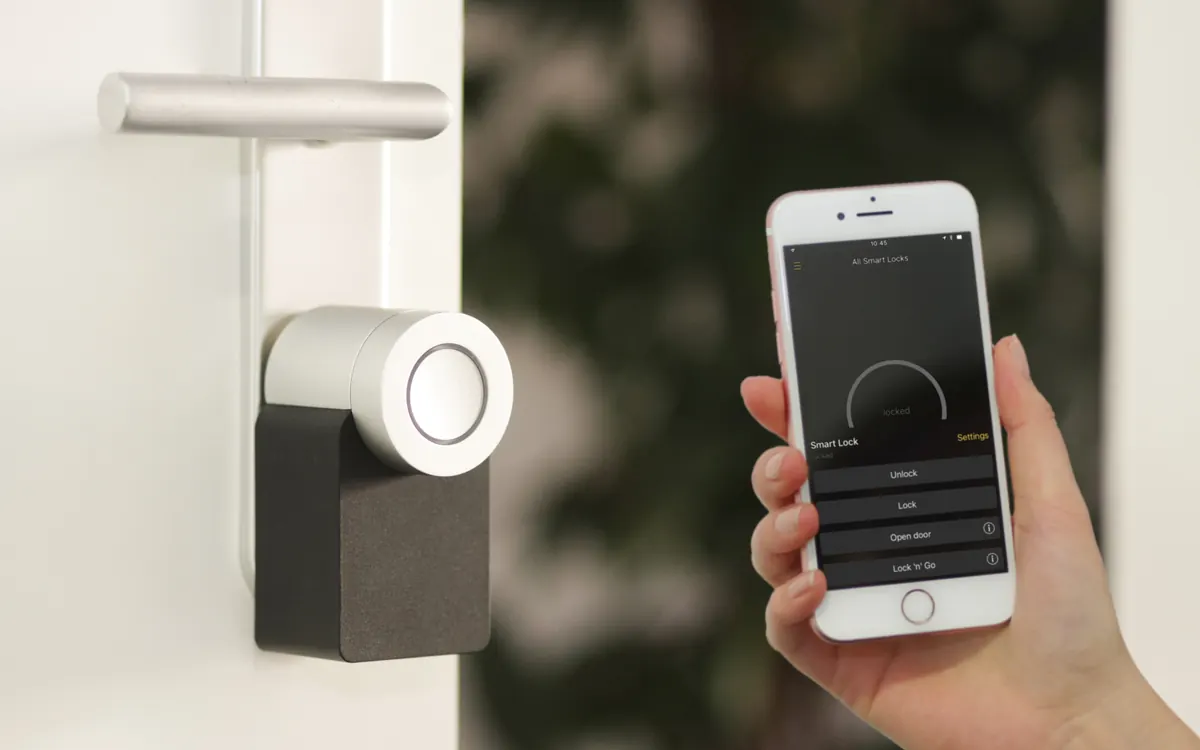
Renting does not rule out a smart home. It changes the shopping list. The best renter setups use devices that plug in, screw in or stick on, work with a router you own, and leave the flat exactly as you found it. This guide sorts common upgrades into "just do it", "do it the reversible way" and "ask first", then covers the network problem most renters hit and a moving-out checklist.
We have not lab-tested products for this article. It is a planning guide based on how these device types install and connect. Always check your tenancy agreement, because rules differ between landlords and countries.
What renters can install without asking
| Upgrade | Renter-friendly? | How it installs | Keep the original |
|---|---|---|---|
| Smart plugs | Yes | Plugs into a socket | Nothing to keep |
| Smart bulbs | Yes | Screws into the existing fitting | Old bulbs |
| Wireless switches and remotes | Yes | Adhesive or magnetic mount over or next to the switch | Nothing removed |
| Battery sensors (door, motion, leak) | Yes | Adhesive pads | Nothing removed |
| Robot vacuum | Yes | Dock plugs into a socket | Nothing to keep |
| Your own router or mesh | Usually yes | Connects to the provider box or wall socket | Provider box, if any |
| Retrofit smart lock | Often, check lease | Fits over the inside of the existing lock | Thumb-turn or adapter parts |
| Battery video doorbell or peephole camera | Often, check building rules | No-drill bracket, door-frame clip or peephole swap | Original peephole |
| Smart radiator valve heads | Often | Replace the plastic head on a thermostatic valve | Old valve heads |
| Wired thermostat, smart switches, new lock cylinder | Ask first | Wiring or lock hardware changes | Everything you remove |
The pattern is simple: if it plugs into a socket or sticks on with removable adhesive, you rarely need permission. If you have to unscrew a wall plate, open wiring or change a lock, ask in writing.
Start with the network you control
Smart devices are only as reliable as the Wi‑Fi they sit on. Renters often get one of three set-ups, and each needs a different fix.
- Your own internet contract with a provider box. You can add your own router or a mesh kit behind it. In a small flat, a well-placed single router is often enough; for longer flats or thick walls, see our mesh Wi‑Fi buying guide on when extra nodes actually help.
- Building-wide or landlord Wi‑Fi. These networks often use client isolation, which stops devices on the same network from seeing each other. Your phone may then fail to find a smart speaker, a Chromecast or a Matter device even though both are "online". If the building gives you an Ethernet port or lets you connect your own router, run your devices on your router instead.
- No internet at all yet. Some devices still work locally — see smart home without internet — but most need a network for setup.
Two settings save a lot of trouble later. Keep 2.4 GHz enabled, because many plugs, bulbs, cameras and robot vacuums only use it (2.4 GHz vs 5 GHz Wi‑Fi). And consider a separate network for gadgets so a cheap camera never shares a network with your laptop: guest Wi‑Fi for smart home devices.
Lighting without rewiring
Smart bulbs are the easiest renter upgrade: they screw into the fittings you already have. The catch is the wall switch. If someone flips it off, the bulb loses power and drops out of the app.
Three reversible fixes:
- Battery wireless switches or remotes that stick on next to the existing switch, or clip over it. Many bulb systems sell them.
- A switch cover or guard that stops the old switch being turned off by habit.
- Smart plugs for lamps. A floor lamp on a smart plug behaves like a smart light with any bulb.
Replacing the wall switch itself with a smart switch means opening wiring, which most leases and many local rules treat as electrical work. Leave it unless the landlord agrees. Our smart bulb buying guide covers bulb types and fittings, and the smart plug buying guide explains load ratings — check them before you put a heater or kettle on a plug.
Locks and doorbells: the reversible way
The front door is where renters most often need permission, because it involves the landlord's lock and sometimes a shared hallway.
Smart locks. A retrofit lock fits over the inside of the existing lock and turns the key or thumb-turn for you. The outside of the door stays the same and you keep using your key, so it is usually the most renter-friendly option. A lock that replaces the cylinder or the whole deadbolt is a hardware change: get permission and keep the original parts. Door types differ a lot (euro-profile cylinders vs deadbolts), so read our smart lock buying guide before you order.
Doorbells. Battery video doorbells avoid wiring, and many come with no-drill brackets that clip onto the door frame or use strong adhesive. In flats with a peephole, a peephole camera replaces the viewer and is easy to swap back. Wired doorbells and anything that connects to the building intercom need permission. Details: video doorbell buying guide.
Heating and thermostats
This is the least renter-friendly area, because the heating system belongs to the building.
- Radiators with thermostatic valves. In many European flats, each radiator has a valve with a plastic thermostatic head. A smart radiator valve head replaces only that head and can usually be swapped back, sometimes with an adapter for the valve brand. Keep the old heads.
- A wall thermostat for a boiler or central system. Replacing it means wiring, and many smart thermostats need a power wire the old one may not have. Ask first. Our smart thermostat buying guide explains compatibility.
- No control at all (common with district heating). A smart plug on a portable heater rated for that load, plus a temperature sensor, may be the only realistic option.
Cleaning: robot vacuums fit renting well
A robot vacuum is one of the most useful renter upgrades because it needs nothing but a socket. A few renter-specific points:
- Small flats do not need the biggest dock. Check the dock footprint and the clear space it needs before you buy.
- Thresholds and rugs vary between flats. If you move often, a robot that copes with higher thresholds is the safer buy.
- Maps belong to one home. After a move, delete the old map and let the robot map the new flat from scratch.
- Neighbours: schedule runs for daytime in buildings with thin floors.
Our robot vacuum buying guide walks through floors, navigation, docks and running costs, and the robot vacuum privacy guide covers camera robots and maps.
Choose a platform that moves with you
Renters change homes more often, so avoid tying everything to one landlord-installed system or one app you cannot leave.
- Matter devices work across Apple Home, Google Home, Amazon Alexa and SmartThings, and can be shared with more than one app. That makes it easier to keep devices when you switch phones or move in with someone on a different platform. Start with Matter and Thread explained.
- Thread devices need a Thread border router, which many current smart speakers, displays and streaming boxes already include — and which you take with you.
- Do you need a hub? Often not for a small flat. See do you need a smart home hub?
If the flat already has smart devices from the landlord, such as a thermostat, intercom or lock, ask who controls the account. Do not add your personal devices to a system the landlord or the next tenant can access.
A sensible order to buy in
- Your own router or mesh if the existing Wi‑Fi is weak or shared.
- Two or three smart plugs for lamps, a fan or a coffee machine. They are cheap and teach you the app.
- Smart bulbs plus a wireless switch for the rooms you use most.
- Battery sensors — a leak sensor under the sink or washing machine can save a deposit.
- A robot vacuum if cleaning time matters to you.
- Retrofit lock or doorbell once you have checked the lease and the door hardware.
+ Pros
- Plug-in and stick-on devices need no permission and move with you
- Matter and your own router keep devices working across homes
- Retrofit locks and radiator heads give real control without hardware changes
− Cons
- Wired thermostats, smart switches and lock cylinders usually need landlord approval
- Building Wi‑Fi with client isolation can break local control
- Cameras near shared areas raise privacy issues with neighbours
Moving-out checklist
- Remove each device from your apps and accounts before you unplug it, including Matter connections in every app that controls it.
- Factory-reset anything that stays behind or that you sell.
- Put back the originals: old bulbs, valve heads, thumb-turn, peephole, wall plates. Keeping them in a labelled bag from day one makes this easy.
- Remove adhesive mounts slowly, pulling the tab or using gentle heat, so you do not take paint with them.
- Delete robot vacuum maps and camera recordings from the old home in the cloud app.
- Change any door codes you shared with friends, cleaners or delivery services, and remove their access.
Frequently asked questions
Can renters have a smart home?
Yes. Smart plugs, bulbs, wireless switches, battery sensors, robot vacuums and your own router need no permanent changes. Locks, thermostats, wired doorbells and wall switches are the parts that usually need permission or a reversible version.
Can I install a smart thermostat in a rented apartment?
A wall thermostat that replaces the existing one involves wiring, so ask the landlord first. If your radiators have thermostatic valves, smart valve heads are often a reversible alternative. Keep the original parts.
Can I put a video doorbell on an apartment door?
Often, using a battery doorbell with a no-drill bracket or a peephole camera. Check building rules, avoid recording shared corridors, and get permission for anything wired or connected to the intercom.
Is a smart lock allowed in a rental?
A retrofit lock that fits over the inside of the existing lock and keeps your key working is usually the safest choice. Replacing the cylinder or deadbolt changes the landlord's hardware and needs permission.
Do smart bulbs work if someone turns off the wall switch?
No. The bulb loses power and goes offline until the switch is turned back on. Use a battery wireless switch next to the old one or a switch guard to stop it being turned off.
Will smart devices work on my building's shared Wi‑Fi?
Sometimes not. Shared networks often isolate devices from each other, which breaks local control, casting and Matter. Connecting your own router, if allowed, usually fixes it.
What happens to my smart devices when I move?
If you keep the same router and network name, most devices reconnect in the new home. Remove them from accounts before you leave anything behind, and re-map robot vacuums in the new flat.
Do I need a smart home hub in a small flat?
Usually not. Many devices connect over Wi‑Fi or use a smart speaker or display as a Thread border router. A hub makes more sense for Zigbee devices or advanced automations.
More from Smart Home
View all →Read next
Dual-Band vs Tri-Band Router: Is the Third Band Worth It?
Dual-band vs tri-band routers and mesh: what the third band really is (second 5 GHz or 6 GHz), when it helps, when it is wasted money, and a buying checklist.
How accurate is smartwatch heart rate? What the research says
How optical heart-rate sensors in smartwatches work, how accurate they are at rest, in steady cardio and in intervals or weights, and how to get better readings.
144Hz vs 240Hz: which refresh rate do you need?
60Hz vs 144Hz vs 240Hz explained: what refresh rate really changes, the frame rate your PC needs, which games benefit, and when 360Hz or 500Hz is worth it.