Dual-Band vs Tri-Band Router: Is the Third Band Worth It?
Dual-band vs tri-band routers and mesh: what the third band really is (second 5 GHz or 6 GHz), when it helps, when it is wasted money, and a buying checklist.
LandGadget Newsroom · · 8 min read
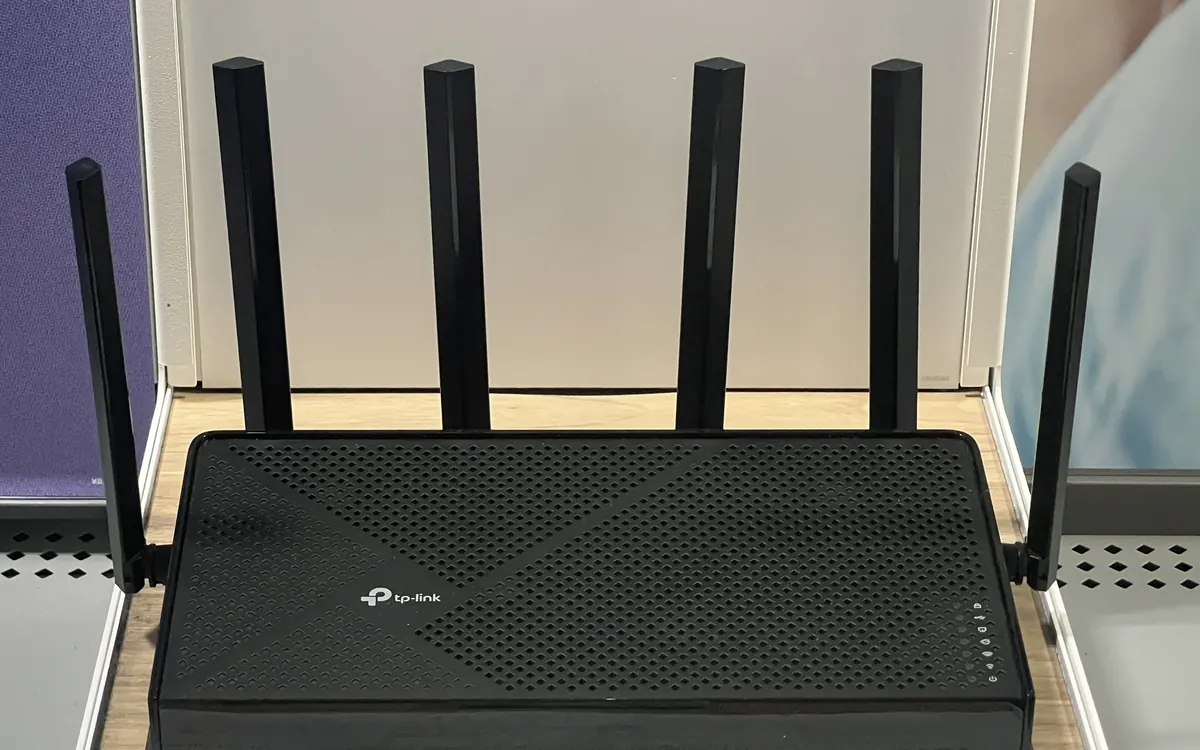
Quick verdictA good dual-band router is enough for most single-router homes. Pay for tri-band when you run wireless mesh without Ethernet between nodes, have many busy devices at once, or own 6 GHz phones and laptops — not to get more range or a faster internet plan.
Jump to the verdict ↓On this page
The box says AX5400 or BE9700, the antenna count looks impressive and the price is double that of the dual-band model next to it. The question is simple: will a third band actually change anything in your home? For many people the honest answer is no. For some — especially mesh owners without Ethernet — it is the most useful upgrade on the spec sheet.
Quick verdict
| Dual-band | Tri-band | |
|---|---|---|
| Radios | 2.4 GHz + 5 GHz | 2.4 GHz + 5 GHz + a second 5 GHz or a 6 GHz radio |
| Best for | Flats and small homes with one router | Wireless mesh, busy households, 6 GHz clients |
| Single-device speed | Same as tri-band on the band it uses | Higher only if that device can use the extra band |
| Range through walls | Set by the 2.4/5 GHz radios | No better; 6 GHz is weaker through walls |
| Main trade-off | Mesh nodes share bands with your devices | Higher price, often a larger box |
What "dual-band" means
A dual-band router has two radios: 2.4 GHz for range and old or simple gadgets (most smart plugs, bulbs and cameras), and 5 GHz for faster connections at shorter distances. Every current phone, laptop and TV supports both. If you are unsure which band suits which device, start with 2.4 GHz vs 5 GHz.
For one router in a flat or a compact house, dual-band covers the basics well — provided the router sits in a sensible spot and on a clean channel.
The two kinds of tri-band
"Tri-band" is a marketing word that hides two different designs. Read the band list on the spec sheet, not the front of the box.
- 2.4 GHz + 5 GHz + 5 GHz. The second 5 GHz radio uses a different part of the 5 GHz spectrum. Every 5 GHz device can use it, so it is good for splitting a crowd of devices or reserving a band for mesh backhaul.
- 2.4 GHz + 5 GHz + 6 GHz. This is Wi‑Fi 6E or Wi‑Fi 7. The 6 GHz band is usually less crowded, but only 6E/7 devices can join it, and it fades faster through walls. We cover that decision in Wi‑Fi 6 vs Wi‑Fi 6E.
Some high-end Wi‑Fi 7 models are quad-band (2.4 + 5 + 5 + 6 GHz). The same logic applies: each extra radio only helps the devices — or mesh nodes — that actually use it.
When tri-band is worth paying for
1. Wireless mesh without Ethernet. In a dual-band mesh, the nodes talk to each other over the same bands your devices use, so each wireless hop eats airtime. A tri-band kit can dedicate one band to backhaul (node-to-node traffic). This is why the mesh Wi‑Fi buying guide recommends tri-band or wired backhaul for heavy streaming and gaming in far rooms.
2. Many busy devices at once. Several 4K streams, video calls, cloud backups and game downloads at the same time compete for 5 GHz airtime. A second 5 GHz radio gives the router somewhere to put half of them.
3. You already own 6 GHz devices. If your phone or laptop shows Wi‑Fi 6E or 7 support, a 2.4/5/6 GHz router lets it use the quieter band at short range — useful in apartment blocks full of neighbouring networks.
When dual-band is enough
- One router, one flat or a small home, and the weak spot is only at the far end. Fix placement first, then consider an extender or mesh — see Wi‑Fi extender vs mesh.
- Mesh nodes connected by Ethernet. With wired backhaul, the third band loses its main job; a dual-band wired mesh is often the better value.
- Few devices, modest plan. If your connection is a typical home plan and two or three people stream at once, a third radio sits mostly idle.
- Your problem is speed everywhere, even next to the router. That points to the plan, the modem or the ISP box — check modem vs router and why is my Wi‑Fi slow.
Buying checklist
Before you pay the tri-band premium, check:
- Which third band? Second 5 GHz or 6 GHz. If none of your devices support 6 GHz, a 2.4/5/6 GHz model mostly helps through mesh backhaul.
- Is backhaul dedicated? For mesh kits, look for "dedicated backhaul" in the specs or app settings, and whether you can switch to Ethernet backhaul later.
- Ethernet ports. Enough ports — ideally gigabit or faster on the WAN side if your plan is fast — matter more than an extra radio for wired TVs, consoles and PCs.
- One network name. Good routers combine bands under one SSID with band steering. Make sure you can still make a separate 2.4 GHz or guest/IoT network for picky smart home gadgets.
- Firmware support. A cheaper router with regular updates beats a flagship that stopped getting patches. See how to update router firmware.
+ Pros
- Dual-band: cheaper, simpler, enough for most single-router homes
- Tri-band: dedicated backhaul keeps wireless mesh faster in far rooms
- Tri-band: spreads load when many devices are busy at once
- Tri-band with 6 GHz: cleaner band for Wi‑Fi 6E/7 phones and laptops
− Cons
- Dual-band: wireless mesh hops share airtime with your devices
- Tri-band: costs more and the extra radio may sit idle in small homes
- Tri-band: does not improve range through walls or a slow internet plan
Our verdict
Dual-band for one router; tri-band for wireless mesh or a busy, 6 GHz-ready home
If you have a single router in a flat or a small house, buy a good dual-band model and spend the difference on placement or an Ethernet cable. Choose tri-band when you run mesh nodes without Ethernet between them, when many devices are busy at the same time, or when your phones and laptops already support 6 GHz. In every case, check what the third band is before you pay for it.
Frequently asked questions
Is a tri-band router faster than dual-band?
Not for a single device on the same band. A phone on 5 GHz gets similar speed from a good dual-band or tri-band router. Tri-band helps when many devices are busy, when mesh nodes need their own backhaul band, or when your device can use 6 GHz.
Does tri-band give better range?
No. Range depends on the 2.4 and 5 GHz radios, antennas, placement and walls. A 6 GHz third band actually reaches less far through walls than 5 GHz.
Do I need a tri-band mesh system?
If your mesh nodes connect wirelessly and you stream or game in far rooms, tri-band with dedicated backhaul is worth it. If you can run Ethernet between nodes, a dual-band mesh is usually enough.
What is the difference between tri-band and Wi‑Fi 6E?
Wi‑Fi 6E routers are tri-band by design: 2.4, 5 and 6 GHz. But not every tri-band router is 6E — some use two 5 GHz radios instead. The spec sheet band list tells you which.
Can smart home devices use the third band?
Usually not. Most smart plugs, bulbs and cameras are 2.4 GHz only. They need stable 2.4 GHz coverage, not an extra 5 or 6 GHz radio.
Should I split the bands into separate network names?
Usually one name with band steering works best. Split them only to troubleshoot or when a 2.4 GHz-only gadget fails to set up on a combined network.
Is dual-band Wi‑Fi 7 worth buying?
It can be for a budget router, but you lose the 6 GHz band, which is where many Wi‑Fi 7 features matter most. If you want Wi‑Fi 7, read our Wi‑Fi 7 guide and compare band lists carefully.
Related networking guides: mesh Wi‑Fi buying guide · Wi‑Fi extender vs mesh · Wi‑Fi 6 vs Wi‑Fi 6E · Wi‑Fi 7 explained · 2.4 GHz vs 5 GHz · best Wi‑Fi channel · where to put your Wi‑Fi router · Ethernet vs Wi‑Fi
More from Computers & AI
View all →Read next
Smart Home for Renters: No-Drill Upgrades That Work
Renter-friendly smart home guide: which plugs, bulbs, locks, doorbells, thermostats and robot vacuums need no drilling, what needs permission, and moving out.
How accurate is smartwatch heart rate? What the research says
How optical heart-rate sensors in smartwatches work, how accurate they are at rest, in steady cardio and in intervals or weights, and how to get better readings.
144Hz vs 240Hz: which refresh rate do you need?
60Hz vs 144Hz vs 240Hz explained: what refresh rate really changes, the frame rate your PC needs, which games benefit, and when 360Hz or 500Hz is worth it.