Wi‑Fi 6 vs Wi‑Fi 6E: Which Router Should You Buy?
Clear buying decision: what Wi‑Fi 6 already gives you, when the 6 GHz band of Wi‑Fi 6E is worth the money, device support, range trade-offs, and when to wait for Wi‑Fi 7.
LandGadget Newsroom · · 8 min read
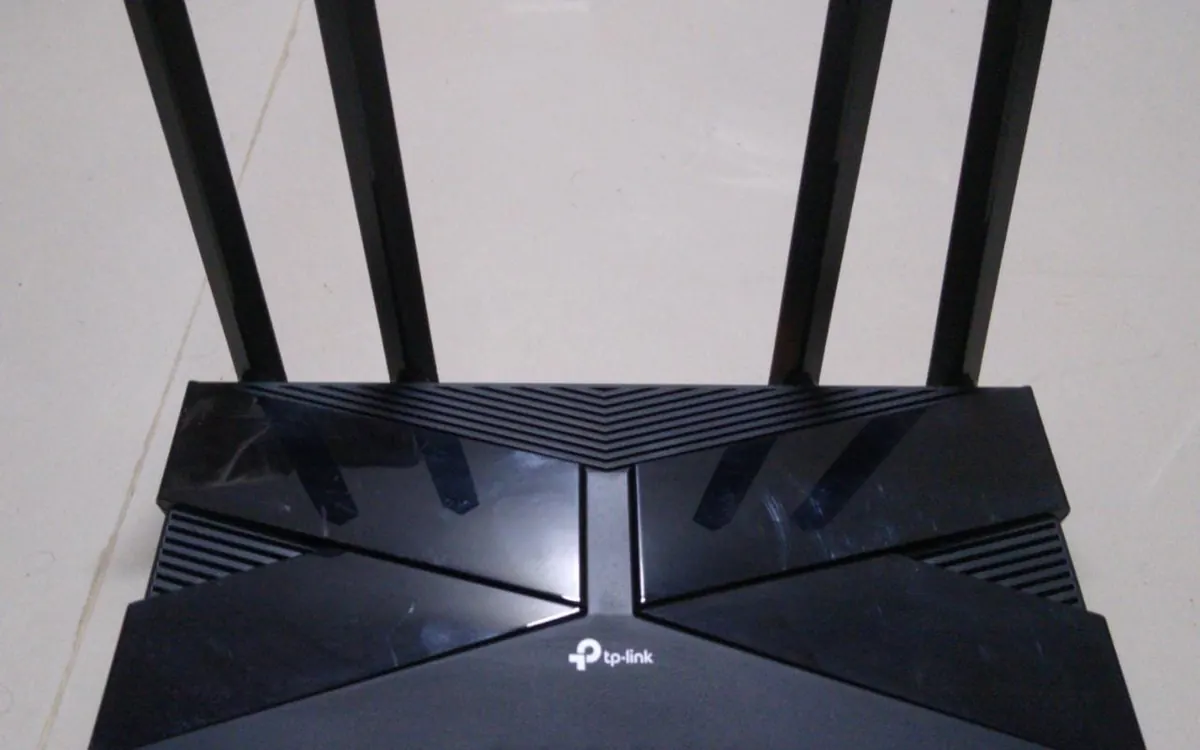
Quick verdictBuy Wi‑Fi 6 for almost every home. Pay for Wi‑Fi 6E only if you already own 6E/7 phones or laptops and want a cleaner 6 GHz band for short-range speed or wireless mesh backhaul — not to fix thick walls or a slow internet plan.
Jump to the verdict ↓On this page
Marketing boxes shout "AX" and "6E" as if they were different generations. They are not. Wi‑Fi 6E is Wi‑Fi 6 with one extra radio band. This guide helps you decide which label to buy — and when to ignore both and look at mesh coverage or Wi‑Fi 7 instead.
Quick verdict
| Wi‑Fi 6 | Wi‑Fi 6E | |
|---|---|---|
| Bands | 2.4 GHz + 5 GHz | 2.4 + 5 + 6 GHz |
| Best for | Most flats and houses | Homes with 6E/7 phones/laptops and short open paths |
| Through walls | Same as any 5 GHz radio | 6 GHz is weaker through walls than 5 GHz |
| Client support | Nearly all recent phones/laptops | Fewer devices; check the spec sheet for "6 GHz" or "Wi‑Fi 6E" |
| Typical reason to buy | Replace an old Wi‑Fi 5 router | Cleaner spectrum / wireless mesh backhaul |
What Wi‑Fi 6 already fixed
Wi‑Fi 6 (IEEE 802.11ax) runs on the familiar 2.4 GHz and 5 GHz bands. Compared with Wi‑Fi 5 it was designed for busy homes: more devices online at once, more efficient airtime (OFDMA), and optional Target Wake Time so battery gadgets can sleep more politely.
For a typical household — streaming, video calls, phones, a few smart plugs — a decent dual-band Wi‑Fi 6 router is enough if:
- your internet plan is roughly under 1 Gbps, and
- coverage is fine after good router placement and a channel check.
Wi‑Fi 6 will not invent free spectrum in a crowded apartment block. It also will not raise a slow ISP plan. Confirm the plan with a wired speed test and modem vs router before you spend on a new radio.
What Wi‑Fi 6E actually adds
The "E" means Extended: regulators opened a large chunk of 6 GHz spectrum for unlicensed Wi‑Fi in many countries. A Wi‑Fi 6E router still speaks Wi‑Fi 6 on 2.4 and 5 GHz; the new piece is a third band that older devices cannot join.
Practical upside of 6 GHz:
- Fewer neighbours on that band today, so less contention for the air.
- Wider channels are easier to find than on crowded 5 GHz (subject to local rules).
- Useful as a clean hop between mesh nodes when you cannot run Ethernet backhaul — see the mesh guide above.
Practical downside:
- Shorter useful range through walls. Higher frequencies lose more energy in brick, concrete and metal. Sitting next to the router, 6 GHz can feel great; two rooms away, clients often fall back to 5 GHz.
- Client tax. Phones, laptops and sticks need an explicit 6E (or Wi‑Fi 7) radio. A Wi‑Fi 6-only phone never uses the new band.
- Regional rules. Which 6 GHz channels you may use depends on the country; outdoor and power limits vary. The router firmware follows local settings, but you cannot assume every channel listed in a US review exists where you live.
Decision checklist
Buy Wi‑Fi 6 if most of these are true:
- Your phones and laptops are Wi‑Fi 6 or older (no 6 GHz in the settings).
- You mainly need reliable coverage and modern multi-device behaviour.
- You are replacing a Wi‑Fi 5 or ISP combo box that struggles with many clients.
- You will hard-wire gaming PCs or consoles when low ping matters.
Buy Wi‑Fi 6E if most of these are true:
- At least one daily driver (phone or laptop) already shows 6 GHz / Wi‑Fi 6E.
- You sit relatively close to the router or can place a node in the same open space.
- You want cleaner air for big local transfers or wireless mesh backhaul, not "more range".
- Your budget still leaves room for Ethernet cables where they matter — 6E is not a substitute for wired backhaul.
Skip both labels and look at coverage first if one room is weak while the room next to the router is fine. Placement, an extender, or mesh fix distance and walls; a newer standard does not.
Wi‑Fi 6 / 6E vs jumping to Wi‑Fi 7
Wi‑Fi 7 adds Multi-Link Operation and wider channels on top of the same band story. It is worth the premium when you already own Wi‑Fi 7 clients or a multi-gig plan. If your devices stop at Wi‑Fi 6, a Wi‑Fi 7 router mostly acts like a very expensive Wi‑Fi 6/6E box for those clients. Details: Wi‑Fi 7 explained.
For mesh shoppers the same rule applies: start with Wi‑Fi 6 kits unless you specifically need 6 GHz backhaul or already bought 6E/7 phones.
One naming trap: every Wi‑Fi 6E router is tri-band (2.4 + 5 + 6 GHz), but not every tri-band router has 6 GHz — some add a second 5 GHz radio instead. How to tell them apart and when either is worth it: dual-band vs tri-band router.
Setup tips that matter more than the badge
- Put the router raised and central; keep it off the floor and away from thick metal and cordless bases.
- Prefer Ethernet for fixed devices; Wi‑Fi standards never beat a cable for latency.
- Separate flaky IoT gadgets onto a guest/IoT SSID when it makes sense: guest Wi‑Fi for smart home.
- Keep firmware current: how to update router firmware.
- Measure before and after with the same speed-test method next to the router and in the weak room.
+ Pros
- Wi‑Fi 6: broad device support, enough for typical home plans, cheaper kits
- Wi‑Fi 6E: cleaner 6 GHz band when clients support it; useful wireless backhaul option
- Both keep older phones working on 2.4/5 GHz
− Cons
- 6E costs more and does nothing for clients without 6 GHz
- 6 GHz range through walls is shorter than 5 GHz
- Neither badge fixes dead zones, double NAT, or a slow ISP modem
Our verdict
Default to Wi‑Fi 6; buy 6E only for 6 GHz clients or backhaul
Most homes should buy a solid Wi‑Fi 6 router (or mesh) and spend the leftover budget on placement, Ethernet, and turning off the ISP box Wi‑Fi. Choose Wi‑Fi 6E when you already have 6E-capable devices and want the cleaner band — not because the box looks newer. If you are already shopping at the top of the shelf with Wi‑Fi 7 phones and a fast plan, read the Wi‑Fi 7 guide before paying twice for overlapping features.
Frequently asked questions
Is Wi‑Fi 6E faster than Wi‑Fi 6?
On paper the 6 GHz band can use wider, less crowded channels, so peak rates can be higher next to the router. Real home gains appear only when a client actually joins 6 GHz. On 2.4 and 5 GHz, 6E routers behave like Wi‑Fi 6.
Will Wi‑Fi 6E fix dead zones?
No. Dead zones are distance and walls. Fix placement first, then consider mesh or Ethernet. 6 GHz usually makes indoor range worse, not better.
Do my smart plugs need Wi‑Fi 6E?
Almost never. Most plugs, bulbs and cameras are 2.4 GHz only. They benefit from stable 2.4 coverage and a sensible guest/IoT network, not from 6 GHz.
Is Wi‑Fi 6 still worth buying in 2026?
Yes for most people. Device support is excellent, prices are mature, and it is enough for common broadband speeds. Buy 6E or 7 when your clients and plan can use the extra bands and features.
Can older phones join a Wi‑Fi 6E router?
Yes, on 2.4 or 5 GHz. They simply cannot use the 6 GHz band. The network name can stay the same if the router uses band steering.
Wi‑Fi 6E or Wi‑Fi 7 for a new mesh?
Default to Wi‑Fi 6 mesh unless you need 6 GHz wireless backhaul or already own 6E/7 clients. Wi‑Fi 7 is the premium step when Multi-Link Operation and multi-gig plans matter — see our Wi‑Fi 7 and mesh buying guides.
Does 6E replace Ethernet backhaul?
No. Wired backhaul is still the most reliable way to link mesh nodes. 6 GHz can be a cleaner wireless hop than crowded 5 GHz, but a cable removes the hop tax entirely.
How do I check if my phone supports 6E?
Open Wi‑Fi details or the manufacturer's spec page and look for Wi‑Fi 6E, 802.11ax on 6 GHz, or a 6 GHz network in the scan list when a 6E router is nearby.
Related networking guides: mesh Wi‑Fi buying guide · Wi‑Fi 7 explained · 2.4 GHz vs 5 GHz · best Wi‑Fi channel · where to put your Wi‑Fi router · modem vs router · what is a good ping · guest Wi‑Fi for smart home · Ethernet vs Wi‑Fi · why is my Wi‑Fi slow · dual-band vs tri-band
More from Computers & AI
View all →Read next
Smart Home for Renters: No-Drill Upgrades That Work
Renter-friendly smart home guide: which plugs, bulbs, locks, doorbells, thermostats and robot vacuums need no drilling, what needs permission, and moving out.
How accurate is smartwatch heart rate? What the research says
How optical heart-rate sensors in smartwatches work, how accurate they are at rest, in steady cardio and in intervals or weights, and how to get better readings.

144Hz vs 240Hz: which refresh rate do you need?
60Hz vs 144Hz vs 240Hz explained: what refresh rate really changes, the frame rate your PC needs, which games benefit, and when 360Hz or 500Hz is worth it.