Do You Need a Smart Home Hub? Matter, Zigbee and Thread
Do you need a smart home hub in 2026? What a hub does, when Wi-Fi devices are enough, how Matter, Thread and Zigbee change things, and which hub to pick.
LandGadget Newsroom · · 6 min read
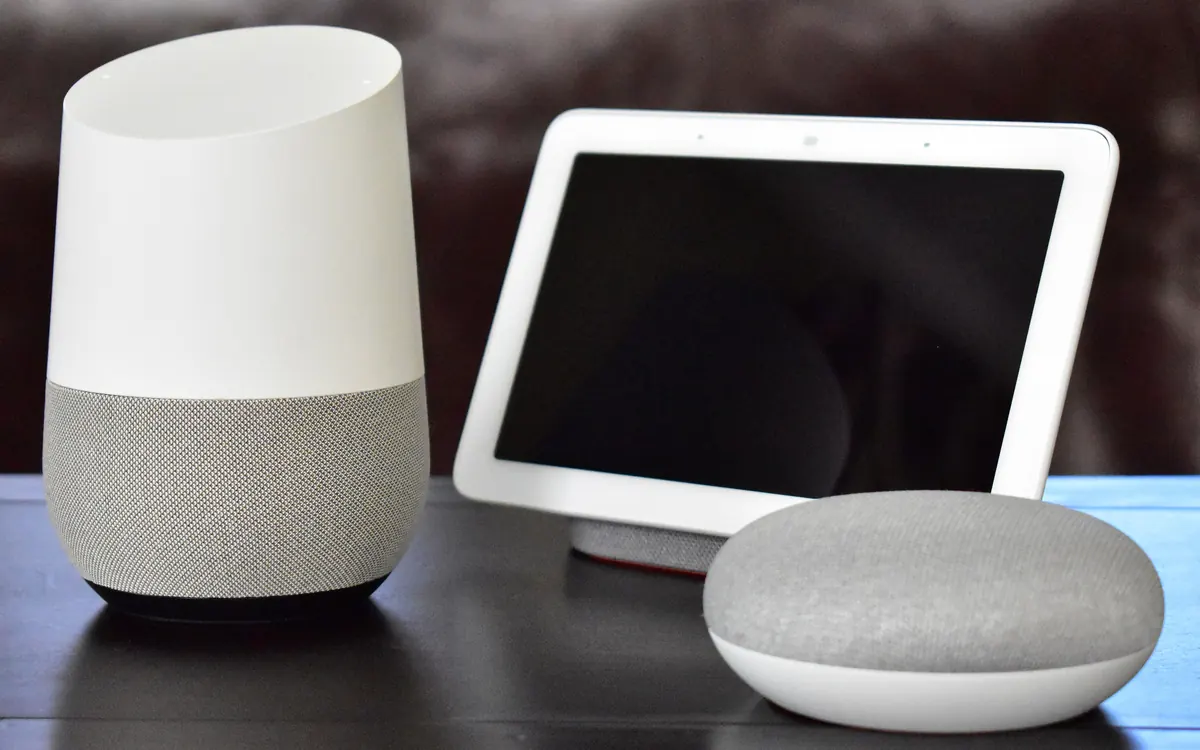
"Do I need a hub?" is one of the most common smart home questions, and the honest answer is: it depends on the devices you buy. A few Wi-Fi plugs work fine on their own. Battery sensors, locks and big lighting setups usually need something in the middle. And with Matter and Thread, the "hub" is often a speaker or streaming box you already own.
This guide explains what a hub actually does, when you can skip it, and which type makes sense.
What a smart home hub does
A hub is a box that sits on your home network and talks to devices on your behalf. Depending on the model, it does one or more of these jobs:
- Radio bridge. Many low-power devices don't use Wi-Fi. Zigbee, Z-Wave and Thread use their own radios, and the hub translates between those radios and your network.
- Controller. It keeps the list of devices, their state and who is allowed to control them. In Matter, this role is called a Matter controller.
- Automation engine. It runs rules such as "turn on the hall light when motion is detected after sunset". Good hubs run these locally, so they keep working if the internet goes down.
- Gateway to apps and voice. It connects devices to an app, a voice assistant or another platform.
For the difference between the standards themselves, see our Matter vs Thread vs Zigbee vs Z-Wave comparison.
When you don't need a hub
You can usually skip a dedicated hub if:
- All your devices use Wi-Fi. Most smart plugs, many bulbs, robot vacuums, cameras and appliances connect straight to your router and are controlled by an app in the cloud.
- You only have a handful of devices and are happy with the maker's app or a voice assistant.
- You use Matter over Wi-Fi. These devices need a Matter controller, but a phone plus a compatible speaker, display or streaming box usually covers that.
The downside of hub-free Wi-Fi setups is that devices often depend on the maker's cloud, can crowd your Wi-Fi and are less battery-friendly. Our guide on whether a smart home works without internet explains what keeps working during an outage.
When you do need one
You need a hub, bridge or border router when:
- You buy Zigbee devices. Zigbee bulbs, sensors and switches always need a Zigbee hub or bridge.
- You buy Z-Wave devices. Same story: Z-Wave needs a Z-Wave controller.
- You buy Matter over Thread devices. These need a Thread border router to connect the Thread mesh to your Wi-Fi network.
- You want reliable local automations, such as motion lighting that responds instantly and keeps working offline.
- You have many devices. Dozens of Wi-Fi gadgets can strain a router; low-power meshes scale better.
Types of hubs in 2026
| Type | Examples | Radios | Best for |
|---|---|---|---|
| Smart speaker or display | Amazon Echo, Google Nest, Apple HomePod | Wi-Fi, Bluetooth; many add Thread, some Zigbee | Simple Matter setups with voice control |
| Streaming box | Apple TV 4K, some Google TV devices | Wi-Fi, Ethernet, Thread | A home hub that stays plugged in near the TV |
| Brand bridge | Philips Hue Bridge, IKEA Dirigera | Zigbee (some Thread), Ethernet | Large lighting setups from one brand |
| Platform hub | SmartThings hubs | Zigbee, Thread, Wi-Fi (varies by model) | Mixing many brands in one app |
| Self-hosted | Home Assistant on a mini PC or Home Assistant Green | Add-on USB radios for Zigbee, Z-Wave, Thread | Full local control and advanced automations |
Speakers, displays and streaming boxes
This is where most people already have a hub without realising it. Many recent Echo, Nest and HomePod models, and the Apple TV 4K, act as a Matter controller and Thread border router. Amazon's latest Echo Dot even builds in Zigbee, Matter and Thread radios, as covered in our report on the new Echo Dot and Echo Show 16. Check the exact model: older or cheaper versions may lack Thread or Zigbee.
Brand bridges
A bridge like the Philips Hue Bridge connects that brand's Zigbee devices and, if it supports Matter, exposes them to other apps. It's a good choice when most of your lights come from one brand.
Platform hubs and Home Assistant
SmartThings hubs and Home Assistant aim to tie everything together. Home Assistant in particular can run Zigbee, Z-Wave, Thread and Matter side by side with powerful local automations, at the cost of more setup and tinkering.
Matter changes the question
Before Matter, choosing a hub meant choosing an ecosystem. Matter's multi-admin feature lets one device be controlled by Apple Home, Google Home, Alexa, SmartThings and Home Assistant at the same time, so your hub choice is less of a lock-in. Two cautions:
- Thread networks can split. Border routers from different brands don't always join the same Thread network, which can leave you with two separate meshes. Keeping border routers from one ecosystem helps.
- Matter support for some device types lags. Cameras, appliances and advanced features may still need the maker's app.
Our Matter starter kit suggests which devices to buy first.
Checklist before you buy
- List what you own. Note the radio each device uses (Wi-Fi, Zigbee, Z-Wave, Thread) and whether it supports Matter.
- Check your speakers and TV boxes. Search the model name with "Thread border router" or "Matter controller".
- Pick one main app. Apple Home, Google Home, Alexa, SmartThings or Home Assistant.
- Decide how much local control matters. If you want automations that work offline, favour hubs that run them locally.
- Plan placement. A hub works best in a central spot with a wired or strong Wi-Fi connection.
Frequently asked questions
Do Matter devices need a hub?
They need a Matter controller, which is often a smart speaker, display or streaming box you already own. Matter over Thread devices also need a Thread border router.
Is a Thread border router the same as a hub?
Not exactly. A border router connects Thread devices to your network. Many hubs, speakers and TV boxes include one alongside other hub features.
Can I use more than one hub?
Yes. With Matter's multi-admin, several apps and hubs can control the same device. Try to keep Thread border routers from one ecosystem to avoid split networks.
Do Wi-Fi smart plugs need a hub?
No. They connect directly to your router and are controlled through an app or voice assistant.
More from Smart Home
View all →Read next

ESA's Hera sees Didymos and Dimorphos apart for the first time
ESA's Hera probe has resolved the Didymos–Dimorphos pair from 1,280 km away. First detailed Dimorphos images since DART's 2022 impact are due 25 November.
DLSS vs FSR vs XeSS: which upscaler should you use?
DLSS vs FSR vs XeSS explained: how each upscaler works, which GPUs support it, frame generation and lag, and which setting to pick on Nvidia, AMD or Intel.
Samsung Community goes offline for 72 hours: back up first
Samsung Community shuts for 72 hours from October 30 for an overhaul. DMs, drafts, bookmarks and subscriptions won't migrate. What to save and what changes after.