Smart plug buying guide: how to choose one in 2026
Smart plug buying guide: Matter vs Wi-Fi vs Thread, load ratings, energy monitoring, outdoor plugs, local control and what you should never plug in.
LandGadget Newsroom · · 8 min read
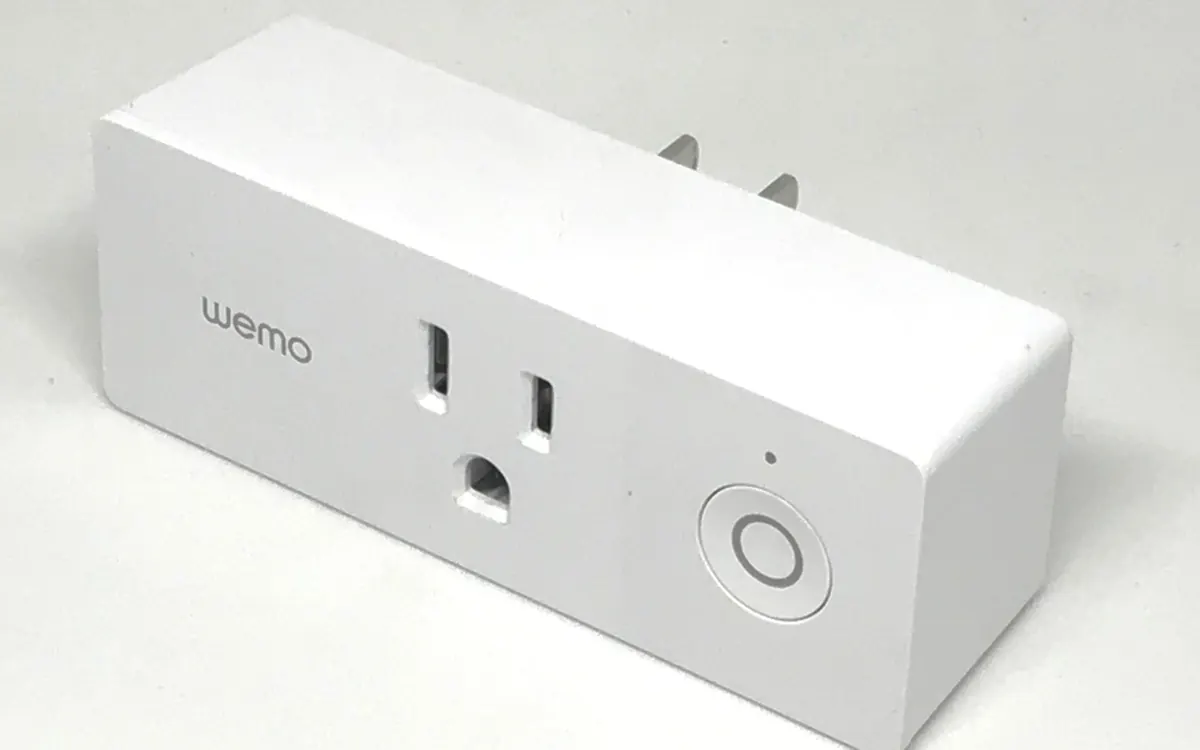
Quick verdictBuy a Matter plug that fits your socket and load, add energy monitoring if you want to cut bills, and pick Thread if you plan to add battery sensors later.
Jump to the verdict ↓On this page
A smart plug is the cheapest way into a smart home. It sits between the wall socket and an ordinary device and lets you switch that device from your phone, by voice, on a schedule or as part of an automation. Lamps, fans, Christmas lights, a coffee machine with a mechanical switch, a dehumidifier, a router that needs a weekly reboot: all become "smart" in a minute.
They all look alike, though, and the differences that matter are on the spec sheet, not the box. This guide covers what to check before you buy.
1. Pick the right standard: Matter, Wi‑Fi, Thread or Zigbee
The connection decides which apps the plug works with, whether it needs a hub and how reliable it is.
| Matter over Wi‑Fi | Matter over Thread | Zigbee | Wi‑Fi (app only) | |
|---|---|---|---|---|
| Needs a hub? | No, just a Matter controller | Yes, a Thread border router | Yes, a Zigbee hub | No |
| Works with Apple, Google, Alexa, SmartThings | Yes | Yes | Via the hub | Depends on the brand |
| Strengthens the mesh for sensors | No | Yes, acts as a router | Yes, acts as a router | No |
| Local control without internet | Usually yes | Usually yes | Usually yes | Often no |
| Best for | A few plugs, no hub | Growing smart homes | Existing Zigbee setups | Single cheap plug |
Matter is the safe default in 2026. A Matter plug can be added to Apple Home, Google Home, Amazon Alexa or Samsung SmartThings with a QR code, and can be shared between them. If you're new to the standard, start with our explainer on what Matter is.
Thread versions are worth a small premium if you already have a Thread border router (many recent HomePods, Nest hubs, Echo speakers and Apple TVs act as one). Every mains-powered Thread plug relays signals for battery devices such as door sensors and locks, which makes the whole network more reliable. Our Matter vs Thread vs Zigbee comparison explains how the protocols fit together.
Plain Wi‑Fi plugs that only work through the maker's app are the cheapest, but they depend on that company's cloud and on the app being maintained. If the service shuts down, the plug can turn into a dumb adapter.
2. Check the load rating
Every plug has a maximum current or power, printed on the case and in the manual. The device you plug in must stay below it.
- Plugs for 230 V sockets (Europe, Ukraine, UK) are commonly rated at 10–16 A. At 230 V, 10 A is about 2,300 W and 16 A about 3,680 W.
- Plugs for 120 V sockets (US, Canada) are commonly rated at up to 15 A, about 1,800 W.
- Motors and compressors (fridges, pumps, air conditioners) draw a surge when they start. If the manual lists a separate motor or inductive rating, use that.
3. Make sure the device will actually turn on
A smart plug only cuts and restores power. It works with devices that turn on by themselves when power returns: lamps with a physical switch left "on", desk fans, string lights and many simple appliances with a mechanical switch. Many modern appliances with touch buttons (TVs, some coffee machines, air purifiers) go into standby when power returns and wait for you to press a button. Check before you buy.
4. Decide if you want energy monitoring
Plugs with energy monitoring measure how many watts the device draws now and how many kilowatt-hours it uses over time. That turns vague worries ("does the console use much on standby?") into numbers, and lets you build automations, such as a notification when the washing machine finishes because its power drops.
Newer versions of Matter define energy reporting, but whether your app shows it depends on the plug and the platform, so check reviews or the maker's support page. If energy data is the main reason you're buying, make sure the app you use can display it.
5. Size, shape and extras
- Size: chunky plugs can block the second socket in a double outlet. Compact or slim designs fit side by side.
- Physical button: essential when the internet or app is down. Most plugs have one.
- Power-on behaviour: the best plugs let you choose what happens after a power cut: on, off or the previous state. "Previous state" stops a freezer from staying off after an outage.
- Indicator LED: an option to turn it off helps in bedrooms.
- Outdoor plugs: for garden lights and decorations, buy a model rated for outdoor use (look for an IP rating such as IP44 or higher) and use it in a sheltered spot.
- Power strips: smart strips with individually switchable sockets suit a desk or TV corner better than several single plugs.
6. Privacy and local control
A smart plug knows when you switch things on and off, which hints at when you're home. Prefer brands that publish a privacy policy, offer security updates and let you control devices locally. Our guide to running a smart home without internet shows how to test which devices keep working when the connection drops.
+ Pros
- Cheapest way to automate lamps, fans and appliances
- Energy monitoring reveals standby costs
- Matter models work across Apple, Google, Alexa and SmartThings
- Thread models strengthen the network for sensors and locks
− Cons
- Only switches power, so touch-button appliances may not turn on
- Bulky designs can block a second socket
- Cloud-only plugs can stop working if the service ends
- Not suitable for high-draw heaters on many models
Setting it up
Plug it in, open the app of your smart home platform, choose "Add device" and scan the Matter QR code on the plug or its box. Keep the code: you'll need it if you reset the plug or move it to another system. Then name the plug after the device it controls ("Living room lamp"), not after the plug itself, so voice commands sound natural. If it's your first device, our list of the best Matter devices to start with suggests what to add next.
Our verdict
A Matter plug with energy monitoring, sized for your socket and load
For most homes the best smart plug is a Matter model with a load rating that comfortably exceeds the device you'll switch, a physical button and a configurable power-on state. Choose Thread if you have a border router and plan to add sensors or a lock; choose Wi‑Fi if you only want one or two plugs. Pay a little more for energy monitoring if you want to understand your bills, and keep heaters off cheap plugs.
Frequently asked questions
Do smart plugs need a hub?
Wi-Fi and Matter over Wi-Fi plugs do not. Thread plugs need a Thread border router, which is built into many recent smart speakers, displays and streaming boxes. Zigbee plugs need a Zigbee hub.
Do smart plugs use electricity when off?
Yes, a small amount, because the radio stays on to listen for commands. It is usually far less than the standby power of the device it controls, and plugs with energy monitoring can show you the figure.
Can I use a smart plug with a space heater?
Only if both manuals allow it and the plug's rating comfortably exceeds the heater's draw. Many plug makers advise against it, and switching a heater on remotely when nobody is home is risky.
Will a smart plug work if the internet goes down?
The button on the plug always works. Matter, Thread and Zigbee plugs can usually still be controlled locally by your hub or app; cloud-only Wi-Fi plugs often cannot.
Why won't my TV or coffee machine turn on with a smart plug?
Appliances with touch buttons often return to standby when power comes back and wait for a button press. A smart plug cannot press that button; it only switches power.
More from Smart Home
View all →Read next
How to choose a laptop in 2026: a practical buying guide
How to choose a laptop in 2026: pick the right type, then CPU, RAM, storage, screen, battery and ports. Simple rules for students, work, gaming and creative use.
HDMI vs DisplayPort: which cable should you use in 2026?
HDMI vs DisplayPort explained: HDMI 2.1 and 2.2 vs DisplayPort 1.4 and 2.1 bandwidth, which to use for gaming monitors, TVs, consoles and laptops, plus cables.
How long does it take to charge an electric car?
From 40+ hours on a wall socket to about 20–40 minutes on a fast charger: how long EV charging really takes, how to work it out for your car, and what slows it.