Modem vs Router: What's the Difference and Do You Need Both? (2026)
Modem vs router explained: what each box does, how to tell which one you have, when a combo gateway is fine, and when buying your own router or modem is worth it.
LandGadget Newsroom · · 7 min read
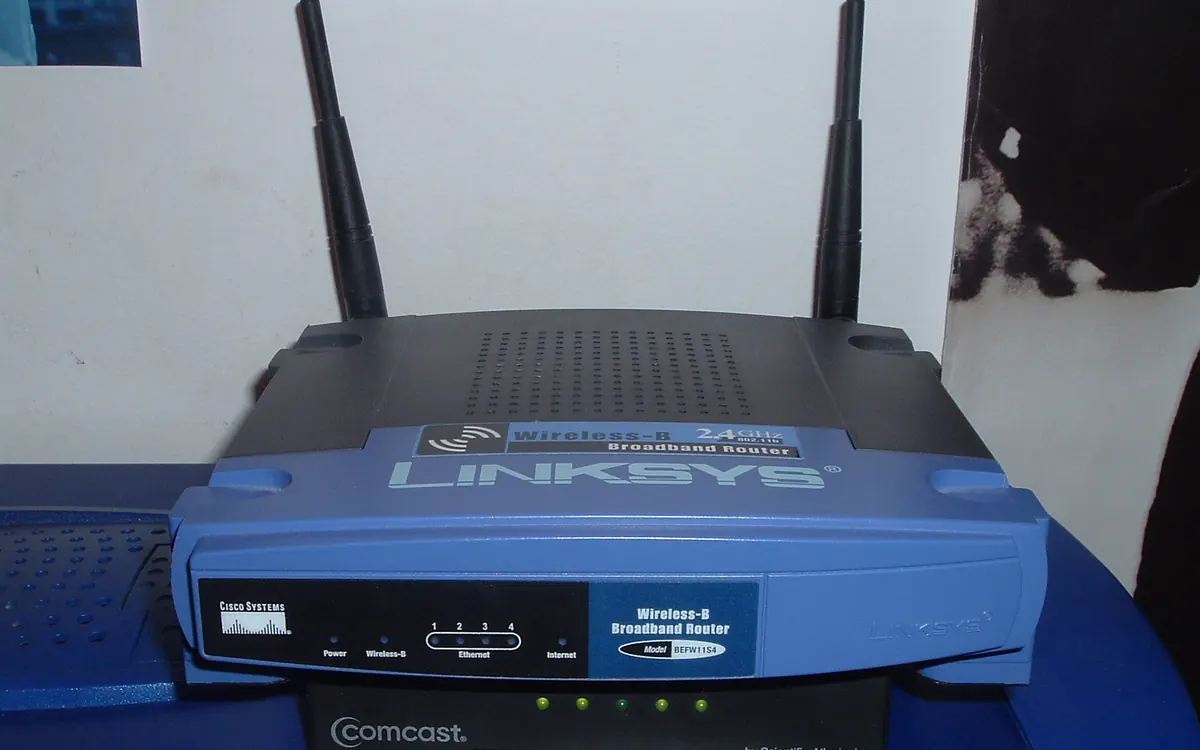
Your internet comes through one or two boxes near the wall socket, and when something goes wrong it helps to know which one does what. Here is the plain-English difference between a modem and a router, how to tell what you have and when upgrading either one is actually worth it.
The short answer
| Modem | Router | |
|---|---|---|
| Job | Connects your home to the provider | Shares the connection inside your home |
| Talks to | Provider's network (coax, phone line, fibre) | Your phones, laptops, TV, smart devices |
| Creates Wi‑Fi | No | Yes (most models) |
| Gives devices local IP addresses | No | Yes |
| Firewall / parental controls | No | Yes |
| Who chooses it | Must be approved by your provider | Any router you like |
Think of the modem as the front door to the internet and the router as the hallway that leads to every room. You need both functions, but they can live in a single box.
What a modem does
A modem (modulator–demodulator) converts the signal on your provider's line into data your devices understand. The type depends on the connection:
- Cable: a DOCSIS modem on the coaxial TV cable. For gigabit plans you want DOCSIS 3.1.
- DSL / VDSL: a modem on the telephone line.
- Fibre: an ONT (optical network terminal), usually a small box where the fibre enters the home. It does the modem's job.
- 5G / LTE home internet: the modem is built into the provider's gateway with a SIM card inside.
A modem gives you one public internet address. On its own it can feed exactly one device over Ethernet.
What a router does
The router takes that single connection and builds your home network. It hands each device a private address, directs traffic to the right one, runs the firewall, and — on virtually every consumer model — broadcasts the Wi‑Fi. Features like guest networks, parental controls, device priority (QoS) and VPN all live in the router.
That is also why most everyday Wi‑Fi complaints are router problems: range, dead zones, crowded channels and too many devices. Our guides on where to put your Wi‑Fi router and the best Wi‑Fi channel fix most of them without buying anything.
Gateways: modem and router in one box
Most providers now ship a gateway (also called a modem‑router or hub) that combines both. It is simpler — one box, one power socket, one support line — and fine for small flats. The trade-offs:
- Weaker Wi‑Fi than a good standalone router or mesh system.
- Slower updates and fewer settings; some providers lock features.
- Rental fees in some countries for a box you never own.
How to tell which one you have
- Look at the ports. A coax screw connector, a phone (RJ11) socket or a green/blue fibre connector means it contains a modem.
- Check for Wi‑Fi. If the box has a network name and password on its label, it contains a router.
- Count the boxes. Fibre homes often have an ONT on the wall plus a separate router; cable homes may have a modem plus router — or a single gateway.
- Search the model number printed on the label; the spec sheet will say "modem", "router" or "gateway".
Which box is causing the problem?
| Symptom | Likely culprit |
|---|---|
| Every device loses the internet at once, Wi‑Fi still shows full bars | Modem / line / provider outage |
| Modem's "online" or "DS/US" light blinks or is off | Modem or line |
| Fast near the router, slow in far rooms | Router (range) — see why is my Wi‑Fi slow |
| Fine on a cable, laggy on Wi‑Fi | Router / Wi‑Fi — see Ethernet vs Wi‑Fi |
| One device slow, others fine | The device itself |
Quick test: plug a laptop straight into the modem (or gateway) with a cable and run a speed test. If that is fast, the line and modem are fine and the issue is Wi‑Fi. Compare the result with what counts as a good internet speed.
Before replacing anything, restart in the right order: unplug the router and modem, plug the modem back in first, wait until it is fully online (2–3 minutes), then power the router.
Should you buy your own router?
Usually yes, if any of these sound familiar:
- Dead zones in a larger home → a mesh Wi‑Fi system instead of one router.
- Many devices, gaming or video calls → a Wi‑Fi 6 or Wi‑Fi 7 router with good QoS.
- You want regular security patches and more control.
Connect your router's WAN/Internet port to a LAN port of the provider's box. Then either put the provider's gateway in bridge mode (or "modem mode") or, if that is not allowed, turn off its Wi‑Fi and set your router as the DMZ host. Otherwise you get double NAT: two routers in a row, which can break online gaming lobbies, VPNs and some smart home devices.
Keep the new router patched — see how to update router firmware.
Should you buy your own modem?
Only on cable in countries where providers allow it (common in the US) and charge a monthly rental. A DOCSIS 3.1 modem usually pays for itself within a year or two. Check your provider's approved-device list first — an unapproved modem will not activate. On fibre, the ONT normally stays the provider's, and on DSL buying your own is rarely worth the setup hassle.
Frequently asked questions
Do I need both a modem and a router?
You need both functions. On cable, DSL and most fibre lines the modem (or fibre ONT) translates your provider's signal, and the router shares it between devices. They can be two boxes or one combined gateway.
Can a router work without a modem?
A router alone cannot reach the internet unless the line is already Ethernet (some fibre and apartment connections). It can still run a local network for printers, NAS or smart home devices.
Is my provider's gateway a modem or a router?
Almost always both. If it has a coax, phone (DSL) or fibre port plus several Ethernet ports and broadcasts Wi‑Fi, it is a modem and router in one.
Will a new router make my internet faster?
It will not raise your plan's speed, but a modern Wi‑Fi 6 or Wi‑Fi 7 router often delivers much more of it to your devices, especially through walls and with many devices connected.
What is bridge mode?
Bridge mode turns off the router part of a gateway so it acts only as a modem. Your own router then handles Wi‑Fi and addresses, which avoids double NAT problems in games and calls.
How often should I replace a modem or router?
A modem lasts until your provider changes technology (for cable, check it supports DOCSIS 3.1). Routers are worth replacing every 4–6 years as Wi‑Fi standards and security updates move on.
More from Smart Home
View all →Read next
How accurate is smartwatch heart rate? What the research says
How optical heart-rate sensors in smartwatches work, how accurate they are at rest, in steady cardio and in intervals or weights, and how to get better readings.

IPS vs VA vs OLED (and TN): which monitor panel type should you buy?
IPS vs VA vs OLED vs TN monitors compared: contrast, colour, viewing angles, response time, burn-in and price, with the best panel for gaming, work and movies.

144Hz vs 240Hz: which refresh rate do you need?
60Hz vs 144Hz vs 240Hz explained: what refresh rate really changes, the frame rate your PC needs, which games benefit, and when 360Hz or 500Hz is worth it.