IPS vs VA vs OLED (and TN): which monitor panel type should you buy?
IPS vs VA vs OLED vs TN monitors compared: contrast, colour, viewing angles, response time, burn-in and price, with the best panel for gaming, work and movies.
LandGadget Newsroom · · 5 min read
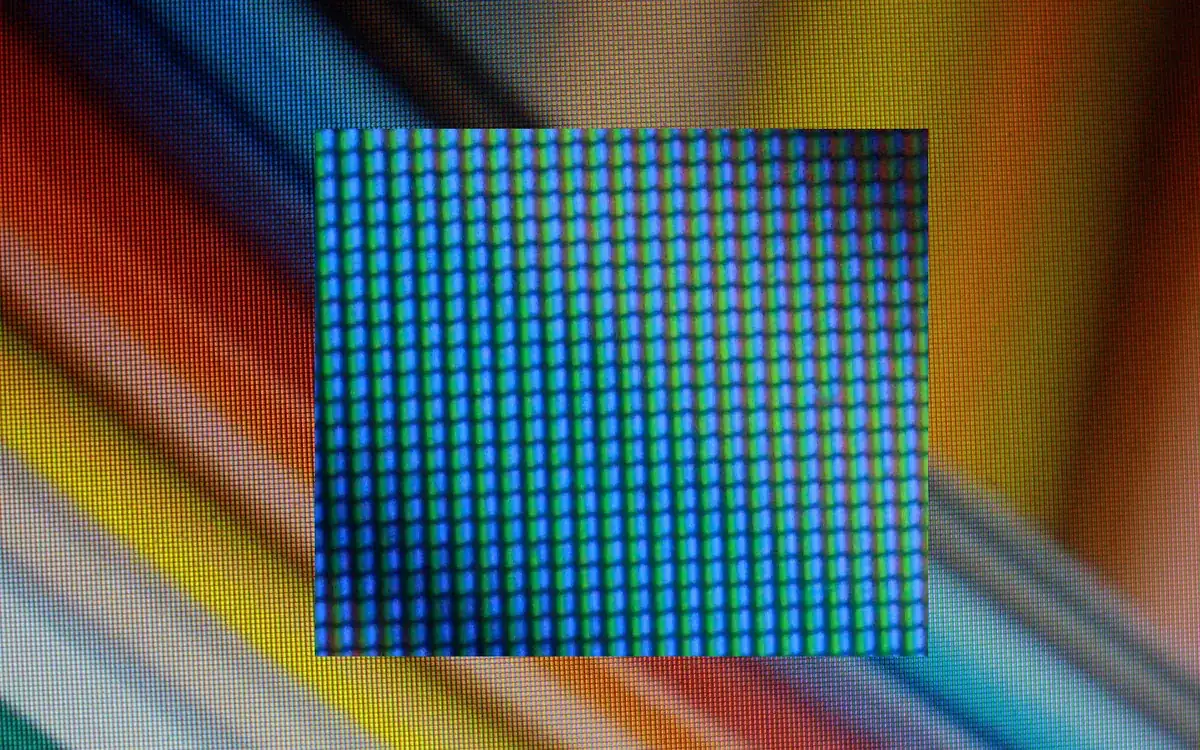
Quick verdictPick IPS for an all-round monitor with accurate colour, VA if you mostly watch films or play in a dark room on a budget, and OLED if you want the best image and motion and can live with the higher price and some burn-in care. TN only makes sense for very cheap esports screens.
Jump to the verdict ↓On this page
The panel type decides more about how a monitor looks than almost any other spec. Two screens with the same size, resolution and refresh rate can look completely different because one uses an IPS panel and the other VA or OLED. Here is what each technology does well, where it falls short, and which one fits the way you use your PC.
Quick comparison
| Panel | Contrast | Colour & angles | Motion | Main weakness | Best for |
|---|---|---|---|---|---|
| IPS | ~1000:1 | very good | good to fast | grey blacks, IPS glow | all-round use, work, most gamers |
| VA | ~3000:1+ | good, narrower angles | slower in dark scenes | dark smearing | films, dark-room gaming on a budget |
| OLED | effectively infinite | excellent | near-instant | price, burn-in, brightness | premium gaming and HDR |
| TN | ~1000:1 | weak, colour shifts | fast | poor image quality | ultra-cheap esports |
Contrast figures are typical values; check reviews of the exact model, because results vary a lot between panels.
IPS: the safe all-rounder
In-plane switching (IPS) LCDs keep colours and brightness consistent even when you look at the screen from the side. That makes them good for photo editing, shared screens and multi-monitor setups. Modern "fast IPS" panels respond quickly enough for competitive games.
The weakness is contrast. Typical IPS monitors manage about 1000:1, so blacks look dark grey in a dim room, and many panels show IPS glow: a milky shine in the corners on dark content. If you play mostly during the day or in a lit room, you may never notice.
VA: deep blacks for less money
Vertical alignment (VA) panels block the backlight better, giving contrast of roughly 3000:1 or more. Dark films and horror games look noticeably richer than on IPS, and VA is common on curved and large ultrawide monitors.
The catch is dark-level response time. When pixels change from black to dark grey, many VA panels are slow, which shows up as smearing behind moving objects in dark scenes. Viewing angles are also narrower, with colour and contrast shifting off-axis. Good high-end VA models reduce smearing, but it is still the first thing to check in reviews.
OLED: best image, with caveats
On an OLED monitor (including QD-OLED and WOLED variants) each pixel produces its own light and switches off completely for black. That gives perfect blacks, no glow or blooming, and near-instant response times, so motion looks very clear at 240Hz and above.
The trade-offs:
- Price. OLED monitors still cost clearly more than IPS or VA at the same size.
- Brightness. They are very bright in small highlights, but full-screen brightness is lower than many LCDs, which matters in a sunny room.
- Burn-in. Static elements such as taskbars or game HUDs can leave permanent marks over time. Monitors fight this with pixel shifting and refresh cycles, and many makers offer burn-in warranties; check the length before you buy.
- Text. Some OLED subpixel layouts make small text look slightly fringed in Windows.
Mini-LED LCDs are a middle ground with many local dimming zones; we compare the two for laptops in OLED vs Mini LED.
TN: only for the tightest budgets
Twisted nematic (TN) panels were once the go-to for fast gaming, but fast IPS and OLED have caught up. TN colours wash out and shift heavily when you move your head. Buy one only if you need a very cheap high-refresh screen for esports.
Which panel should you choose?
- Mixed use, office work, photo editing: IPS.
- Movies and single-player games in a dark room, limited budget: VA, ideally a model with reviewed low smearing.
- The best gaming and HDR picture: OLED, if the price fits and you can hide static elements or accept some care.
- Competitive shooters on a tight budget: fast IPS first; TN only if it is much cheaper.
Panel type is one part of the decision. Match it with the right size for your desk, check variable refresh support in our FreeSync vs G-Sync explainer, and see the full checklist in our gaming monitor buying guide.
FAQ
Is IPS or VA better for gaming? For most players IPS, because it handles fast motion more cleanly. VA wins if you play slower, darker games and care most about contrast.
Is OLED burn-in still a problem? The risk is lower than with early OLEDs, thanks to pixel shifting and refresh routines, but it hasn't disappeared. Varied use is fine; the same static layout for hours every day carries the highest risk.
What about "Nano IPS" or "Fast IPS"? These are marketing names for IPS variants with wider colour or faster response. They are still IPS, with the same contrast limits.
More from Computers & AI
View all →Read next
How accurate is smartwatch heart rate? What the research says
How optical heart-rate sensors in smartwatches work, how accurate they are at rest, in steady cardio and in intervals or weights, and how to get better readings.
How long do robot vacuums last? Lifespan, parts and when to replace
How many years a robot vacuum really lasts, which parts wear out first (battery, brushes, filters), replacement intervals, signs it's time to replace, and how to extend its life.
144Hz vs 240Hz: which refresh rate do you need?
60Hz vs 144Hz vs 240Hz explained: what refresh rate really changes, the frame rate your PC needs, which games benefit, and when 360Hz or 500Hz is worth it.