OLED vs Mini-LED laptop screens: which should you buy?
OLED vs Mini-LED laptop displays compared: blacks, brightness, blooming, burn-in, battery life, PWM flicker and price, and which to pick for work and HDR.
LandGadget Newsroom · · 7 min read
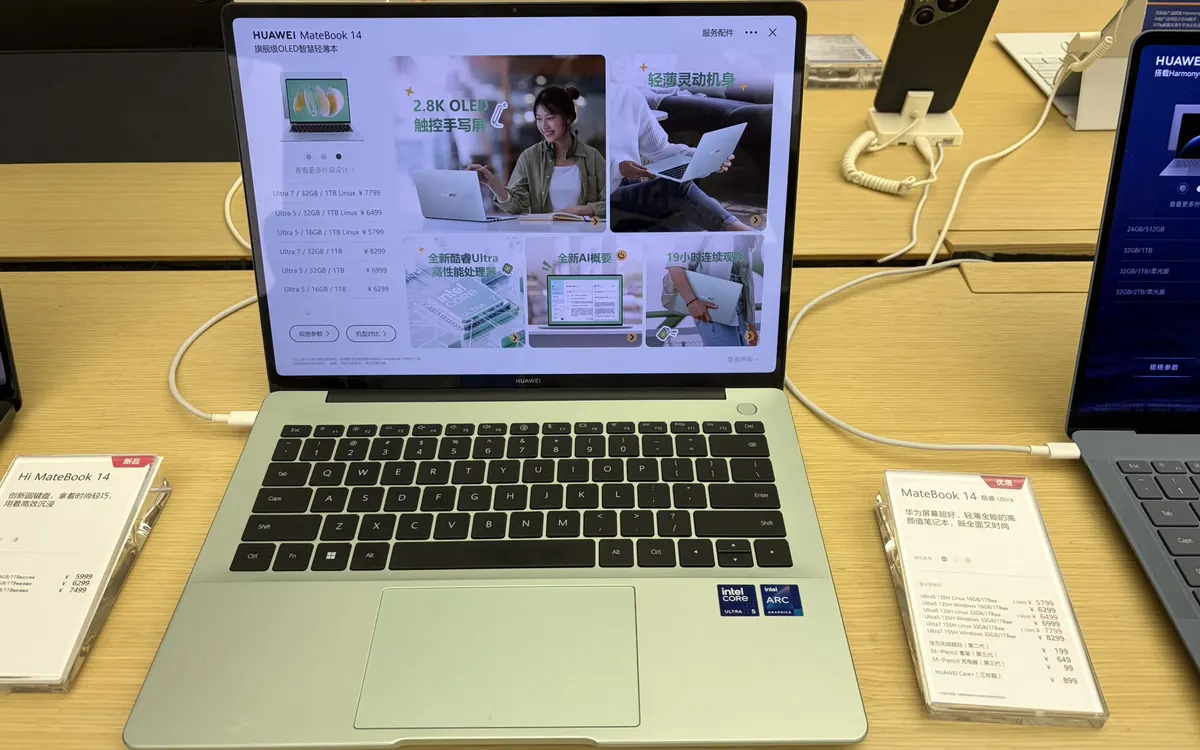
Quick verdictPick OLED for perfect blacks, motion clarity and HDR films in normal or dim rooms; pick Mini-LED if you work long hours with static windows, need very bright sustained output, or want zero burn-in worry. Ordinary IPS is still fine for spreadsheets on a budget.
Jump to the verdict ↓On this page
OLED and Mini-LED used to be TV terms. Now they decide which laptop you buy: Apple has just moved its top MacBook Pro from Mini-LED to a tandem OLED touchscreen, while Windows makers sell both. Both are big upgrades over a basic IPS screen, but they get there in opposite ways, and that changes how they handle bright rooms, dark films, static toolbars and battery life. Here is what actually matters.
How each technology works
OLED (organic light-emitting diode) has no backlight. Every pixel produces its own light and can switch fully off. That gives true black, infinite contrast on paper and very fast pixel response. Most laptop OLEDs are made by Samsung Display or LG Display; tandem OLED stacks two emitting layers, so each layer works less hard for the same brightness. That means higher brightness and a longer life, which is why Apple uses it in the iPad Pro and the new MacBook Pro.
Mini-LED is still an LCD. Behind the liquid-crystal layer sits a backlight made of thousands of tiny LEDs grouped into local dimming zones. Dark parts of the image get dimmer zones, bright parts get brighter ones. Contrast is far better than a normal LCD, and an LED backlight can run very bright for long periods. The limit is that a zone is much bigger than a pixel.
Side-by-side comparison
| OLED | Mini-LED | |
|---|---|---|
| Black level | True black, pixel by pixel | Very good, limited by zone size |
| Blooming / halos | None | Visible around bright objects on black |
| Sustained full-screen brightness | Usually lower; dims on large white areas | Usually higher and steadier |
| Motion clarity | Near-instant pixel response | LCD response; can smear in fast games |
| Burn-in risk | Possible with static elements over long periods | None |
| Battery use | Low on dark content, higher on white pages | Fairly constant; high at peak HDR |
| Flicker | Some panels use low-frequency PWM dimming | Depends on backlight; often DC-like |
Contrast and HDR: OLED's big win
With an OLED, a white subtitle on a black frame is just that, with no glow around it. On Mini-LED, the zone behind the subtitle has to light up, so you can see a faint halo, called blooming, especially with the screen at an angle or in a dark room. More zones reduce it, and good dimming algorithms hide it well, but it never fully disappears. Star fields, dark-mode code editors and letterboxed films show the difference most.
Brightness: Mini-LED's big win, for now
OLED panels protect themselves by lowering brightness when a large part of the screen is bright. That's called the auto brightness limiter. A white web page at full screen may look noticeably dimmer than a small HDR highlight. Mini-LED can hold high brightness across the whole screen for a long time, which helps outdoors, near a window, or when grading HDR video. Tandem OLED narrows the gap: Apple quotes the same 2,000-nit peak for SDR and HDR on its new PROLED XDR panel. Check reviews for sustained full-screen brightness, not just the peak number on the box.
Burn-in: real but manageable
Burn-in, or permanent image retention, happens when the same bright shapes, like a taskbar, a dock or a game HUD, stay on screen for many hours over months. Organic pixels that work harder age faster. Modern laptops fight this with pixel shifting, panel refresh cycles and dimming of static areas, and tandem designs age more slowly. To reduce the risk:
- use dark mode and auto-hide the taskbar or dock;
- set a short screen-off timer and avoid leaving static screens at full brightness;
- check whether the warranty covers burn-in, because policies differ by brand.
If your laptop shows the same trading terminal or IDE for ten hours a day, Mini-LED (or IPS) removes the worry entirely.
Battery life
OLED power draw depends on what's on screen: dark themes and films are cheap, bright white documents are expensive. A Mini-LED's backlight draws a fairly steady amount until HDR pushes it high. In practice the panel is only part of the story, and the chip, battery size and refresh rate matter just as much, so compare battery tests of the exact models rather than the technology. If you also care about long-term battery health, read our guide on whether fast charging is bad for your battery.
Eye comfort and PWM
Many OLED laptops dim with pulse-width modulation (PWM), switching the pixels on and off rapidly. Most people never notice, but a minority get headaches or eye strain, especially at low brightness. Some newer panels use higher-frequency PWM or DC-like dimming. If you're sensitive, look for reviews that measure the PWM frequency. Mini-LED backlights can also use PWM, so check either way.
Gaming
OLED's near-instant pixel response makes fast motion look crisp, and true blacks suit dark games. That's why OLED dominates high-end gaming monitors. If you're also choosing a desktop screen, see our gaming monitor guide. Mini-LED gaming laptops can be brighter for HDR, but slower LCD pixels can leave trails in shooters.
Touch, glossy and matte
Touch works on both types; it depends on the laptop, not the panel technology. Most OLED laptops are glossy, which deepens blacks but reflects lamps and windows. Matte or "nano-texture" finishes cut reflections at a small cost in punch. If you work under office lights, that choice can matter more than OLED vs Mini-LED.
Which should you buy?
OLED at a glance, compared with Mini-LED:
+ Pros
- Best for films, HDR, photo viewing, dark-mode work and gaming in normal light
- No blooming, and thinner, lighter designs
− Cons
- Burn-in risk with static UI over long periods
- Often lower sustained full-screen brightness and possible PWM flicker
Our verdict
OLED for most people who watch, edit and game; Mini-LED for static-heavy work and bright rooms
If you watch films, edit photos or play games, and mostly work indoors, OLED gives the best-looking picture today, especially a tandem OLED. Choose Mini-LED if you spend all day on static apps, work in very bright places or simply don't want to think about burn-in. On a budget, a good IPS screen with accurate colour is better than a cheap panel with a fancy label. Whatever you choose, pair it with enough memory; here's how much RAM you really need.
Frequently asked questions
Is OLED or Mini-LED better for a laptop?
OLED is better for contrast, HDR films and motion; Mini-LED is better for sustained brightness and for work with static windows because it cannot burn in. Neither wins for everyone.
Do OLED laptops still get burn-in?
They can, after many hours of the same bright static elements, but modern panels use pixel shifting and refresh cycles to reduce it. Dark mode, auto-hiding toolbars and screen timeouts help, and some brands cover burn-in under warranty.
What is tandem OLED?
A tandem OLED stacks two light-emitting layers. Each layer runs at lower stress for the same brightness, so the panel can get brighter and last longer than a single-layer OLED.
Does OLED use less battery than Mini-LED?
It depends on content. OLED uses less power on dark images and dark mode, and more on bright white pages. Compare battery tests of the specific laptops rather than the panel type.
What is blooming on a Mini-LED screen?
Blooming is a faint glow around bright objects on a dark background. It happens because each dimming zone covers many pixels, so light from a lit zone spills into dark areas nearby.
More from Computers & AI
View all →Read next
Robot vacuums for carpets vs hard floors: what to look for
Carpet, rugs or hard floors? Which robot vacuum features matter for each: brushes, carpet boost, threshold height, mop lifting, edge cleaning and setup per room.
ESA's Hera sees Didymos and Dimorphos apart for the first time
ESA's Hera probe has resolved the Didymos–Dimorphos pair from 1,280 km away. First detailed Dimorphos images since DART's 2022 impact are due 25 November.
DLSS vs FSR vs XeSS: which upscaler should you use?
DLSS vs FSR vs XeSS explained: how each upscaler works, which GPUs support it, frame generation and lag, and which setting to pick on Nvidia, AMD or Intel.