Is fast charging bad for your phone battery?
Does fast charging damage your phone battery? How fast charging works, why heat matters more than watts, and simple settings that keep your battery healthy longer.
LandGadget Newsroom · · 7 min read
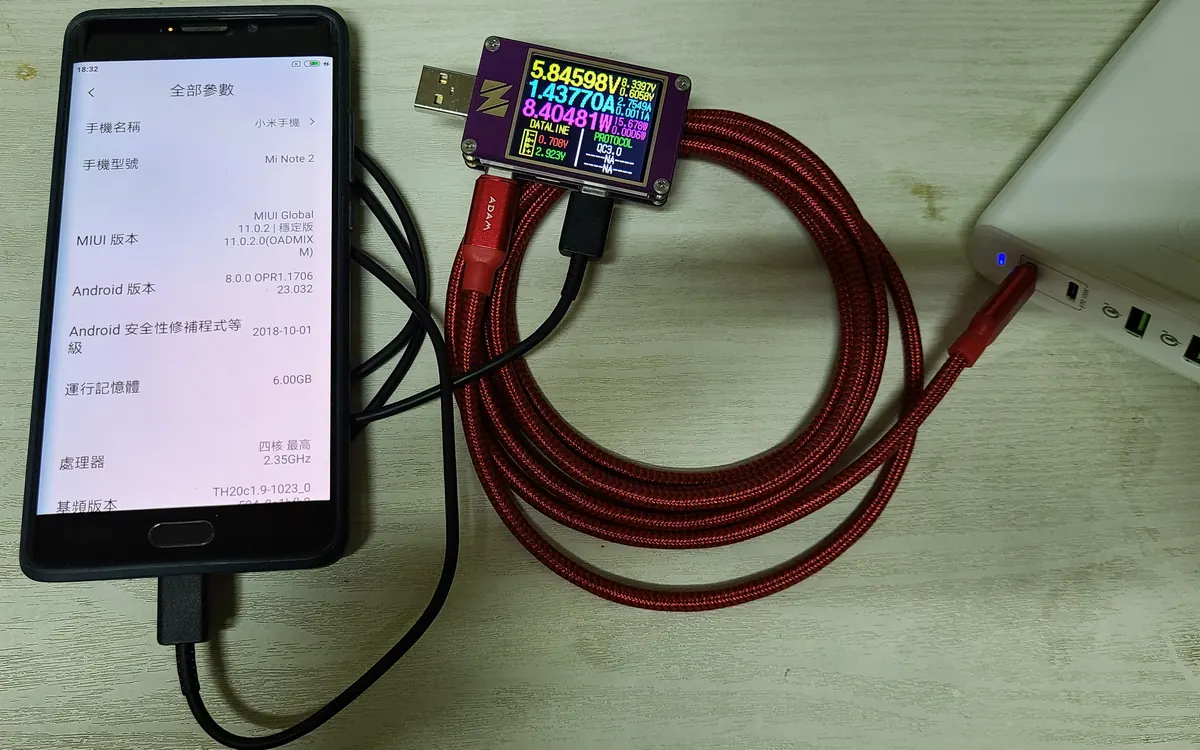
Phones that charge from empty to half in a quarter of an hour feel like magic, and they raise an obvious question: does fast charging ruin the battery? The short answer is no, not by itself, as long as you use a charger and cable that your phone supports. The longer answer is about heat, time spent at a full charge and a few settings most people never touch. This explainer covers how fast charging works, what really wears a lithium-ion battery and what you can do about it.
How fast charging works
A phone battery is charged in two main phases:
- Constant current. While the battery is low, the phone pulls the highest current it is allowed. This is where the headline wattage happens and why the first 50% arrives so quickly.
- Constant voltage. As the cell nears full, the voltage is held steady and the current drops off. That is why the last 20% takes much longer than the first 20%, even on a 100 W charger.
The phone decides how much power it accepts. The charger and phone negotiate over a protocol such as USB Power Delivery (USB PD), its PPS extension, or a brand-specific system like Qualcomm Quick Charge, OnePlus/OPPO SUPERVOOC or Xiaomi HyperCharge. If the charger offers more than the phone wants, the phone simply takes less. Plugging a phone into a powerful laptop charger is therefore normal and safe, provided the charger is a reputable USB-C PD model. Our USB-C charger guide explains how to pick one.
What actually wears out a battery
Every lithium-ion battery loses capacity over time; there is no setting that stops it completely. The main factors are:
- Heat. High temperature speeds up the chemical reactions that age a cell. A phone that gets hot while charging, gaming or lying in the sun ages faster. This is the real link between fast charging and wear: more power means more heat, unless the phone manages it well.
- Time at high charge. Sitting at 100% for hours, especially when warm, stresses the battery. That is why manufacturers now offer charging limits and "smart" overnight charging.
- Charge cycles. Each full cycle of use (100% of capacity, in one go or across several days) adds a little wear. You can't avoid cycles, but you can make them gentler.
- Deep discharge. Regularly running a phone to 0% is harder on it than topping up from 20–30%.
Fast charging mainly affects the first point. Modern phones monitor battery temperature and slow charging down automatically when the cell gets warm, and many use split or multi-cell batteries and extra charge-pump chips to spread the heat. Very high wattages (100 W and above) usually rely on these tricks.
Fast charging vs slow charging: the real trade-off
| Fast charging | Slow charging (5–10 W) | |
|---|---|---|
| Speed | Large top-up in minutes | Hours for a full charge |
| Heat | Higher, managed by the phone | Low |
| Best for | Quick top-ups during the day | Overnight charging |
| Long-term wear | Slightly more if the phone runs hot | Lowest |
In practice, a phone that charges at full speed for 20 minutes during the day and slowly overnight will age much like one that always charges slowly. The difference only becomes noticeable if fast charging regularly pushes the phone into high temperatures.
Does wireless charging wear the battery more?
Wireless charging is less efficient than a cable, and the lost energy turns into heat. A phone on a wireless pad often runs warmer than on a cable at the same wattage, especially if it's in a thick case or slightly misaligned. It isn't dangerous, but if battery longevity is your priority, a cable is the gentler option. Magnetic Qi2 chargers help because they keep the coils aligned.
Settings that protect your battery
Most phones already have the tools; they just aren't always switched on.
- iPhone: Settings → Battery → Charging offers Optimised Battery Charging, and on iPhone 15 and later you can set a charge limit (for example 80%).
- Samsung Galaxy: Settings → Battery → Battery protection lets you cap charging at around 80–85% or use an adaptive mode, and you can turn fast charging off in the same menu.
- Google Pixel: Adaptive Charging finishes the charge just before your alarm, and newer Pixels add a charging limit option.
- Other Android phones: look for "smart charging", "optimised charging" or "battery protection" in the battery settings; names vary by brand.
You'll find where to see your battery's current state in our guide on how to check phone battery health.
Good charging habits
- Use a decent charger and cable. Cheap no-name chargers may lack proper protection, and that's a safety risk as well as a battery one.
- Keep it cool. Take the phone out of a thick case if it gets hot while charging, and don't charge under pillows or in direct sun. If your phone often heats up, read why phones overheat.
- Top up rather than drain. Charging from roughly 20% to 80% is the gentlest everyday range, but don't obsess: a full charge before a long day is fine.
- Charge slowly at night with adaptive charging or a low-power charger if you prefer.
- Store it half-charged. If a phone will sit in a drawer for weeks, leave it at around 50%, not full or empty.
Do new battery types change the answer?
Many 2025–2026 phones use silicon-carbon batteries, which pack more capacity into the same space. They follow the same basic rules (heat and high state of charge are the enemies), and manufacturers tune their charging accordingly. Our silicon-carbon battery explainer covers what is different about them.
Frequently asked questions
Is it bad to fast charge my phone every day?
No. Phones are designed for daily fast charging with a supported charger. Battery wear comes mostly from heat and long periods at 100%, so avoid charging when the phone is already hot and use a charge limit or adaptive charging if available.
Can a more powerful charger damage my phone?
A good USB-C PD charger with a higher rating is safe because the phone only draws the power it negotiates. The risk comes from poor-quality or damaged chargers and cables, not from a higher wattage label.
Should I turn off fast charging?
You don't need to. If you charge overnight and never need speed, turning it off or using adaptive charging slightly reduces heat. During the day, fast top-ups are fine.
Is it OK to leave my phone charging overnight?
Yes. Phones stop charging when full. To reduce time at 100%, enable optimised or adaptive charging, or set an 80% limit if your phone supports it.
Is wireless charging worse than fast wired charging?
Wireless charging produces more heat for the same amount of energy, so it can be slightly harder on the battery, especially in thick cases. Magnetic chargers that keep the phone aligned reduce that heat.
More from Smartphones
View all →Read next

Robot vacuums for carpets vs hard floors: what to look for
Carpet, rugs or hard floors? Which robot vacuum features matter for each: brushes, carpet boost, threshold height, mop lifting, edge cleaning and setup per room.

ESA's Hera sees Didymos and Dimorphos apart for the first time
ESA's Hera probe has resolved the Didymos–Dimorphos pair from 1,280 km away. First detailed Dimorphos images since DART's 2022 impact are due 25 November.
DLSS vs FSR vs XeSS: which upscaler should you use?
DLSS vs FSR vs XeSS explained: how each upscaler works, which GPUs support it, frame generation and lag, and which setting to pick on Nvidia, AMD or Intel.