How much RAM do you need in 2026? 8, 16, 32 or 64 GB explained
What RAM does, how to tell if you're running out, and how much memory to get for browsing, office work, gaming, video editing and local AI in 2026.
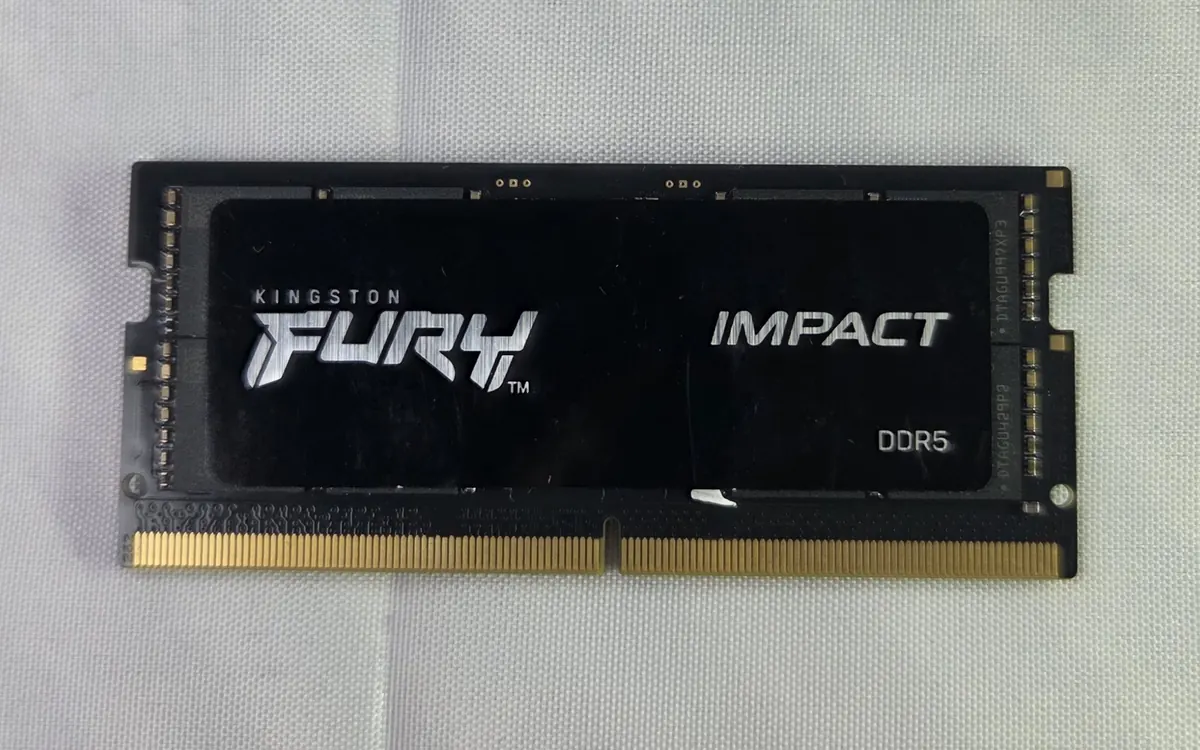
RAM (memory) is your computer's short-term workspace. Every open app, browser tab and file you're editing lives there while you use it. When RAM fills up, the system starts moving data out to the much slower SSD (a swap file or page file). That's when tabs reload, switching apps stutters, and games hitch.
More RAM doesn't make a computer faster by itself. It stops the slowdown that happens when you run out. So the right amount depends on what you keep open at the same time.
How much RAM for what
| 8 GB | 16 GB | 32 GB | 64 GB+ | |
|---|---|---|---|---|
| Browsing, email, streaming | OK | Comfortable | More than needed | More than needed |
| Office work + many tabs | Tight | Comfortable | Roomy | More than needed |
| Gaming | Too little for many new games | Common baseline | Headroom for Discord, browser, streaming | Rarely useful |
| Photo / 4K video editing | Frustrating | Entry level | Recommended | Large projects, effects |
| Local AI models, VMs | Tiny models only | Small models | Mid-size models | Large models, several VMs |
8 GB: only for light use
Eight gigabytes still runs Windows 11 (the official minimum is 4 GB), macOS and ChromeOS. But a modern browser with a dozen tabs, a chat app and a video call can fill it quickly. It's fine for a budget Chromebook or a second computer, but we wouldn't buy a main laptop with 8 GB in 2026.
16 GB: the default for most people
Sixteen gigabytes is enough for heavy browsing, office apps, photo editing and most games. It's also the floor the big platforms now set. Microsoft requires at least 16 GB for Copilot+ PCs, and Apple has shipped every Mac with at least 16 GB since late 2024.
32 GB: for creators, gamers who multitask, and developers
Choose 32 GB if you edit 4K video, work with large RAW photo libraries, run Docker or virtual machines, build big code projects, or game with a browser, Discord and streaming software open. It's also the practical minimum for running mid-size AI models locally. See our laptop for local AI guide.
64 GB and up: specialist work
This is for large local language models, 3D rendering and VFX, scientific datasets, or several VMs at once. If you're not sure you need 64 GB, you almost certainly don't.
Local AI: why memory matters most
AI models have to fit in memory to run quickly. A rough rule of thumb: a model compressed to 4 bits ("Q4") needs a little over half a gigabyte per billion parameters, plus room for the context and your other apps. An 8-billion-parameter model therefore wants roughly 5–6 GB free, and a 70B model needs far more than 32 GB. On a PC with a graphics card, the GPU's own VRAM matters most. On Apple silicon Macs and other machines with unified memory, the system RAM is shared by the CPU and GPU, which is why high-memory Macs are popular for local AI.
How to check if you're running out
- Windows: Task Manager (Ctrl + Shift + Esc) → Performance → Memory. If "In use" stays near the total and "Committed" is above your physical RAM, you need more.
- macOS: Activity Monitor → Memory tab → look at the Memory Pressure graph. Green is fine, yellow means it's working hard, and red means you're short.
- Linux: run
free -hand watch the swap usage while you work.
Check while you're doing your heaviest normal workload, not when the computer has just started.
Upgrading: what to know first
- Match the generation. DDR4 and DDR5 modules are not interchangeable: the notch is in a different place and they won't fit each other's slots. Laptops use smaller SO-DIMM modules, and some new ones use CAMM2.
- Use two sticks. Two identical modules run in dual-channel mode and give noticeably more bandwidth than one. This matters for integrated graphics and games.
- Check the maximum. Your motherboard or laptop manual lists the supported capacity and speeds.
- Speed matters less than capacity. Running out of RAM hurts far more than having slightly slower RAM.
Frequently asked questions
Is 8 GB of RAM enough in 2026?
For a basic Chromebook or a computer used only for browsing and email, yes. For a main Windows laptop or Mac, 16 GB is the sensible minimum because browsers and apps keep getting heavier.
Is 32 GB of RAM overkill for gaming?
Not overkill, but not required for most games. 16 GB is the common baseline. 32 GB helps if you stream, keep many apps open while playing, or want headroom for future games.
Does more RAM make my computer faster?
Only if you are running out. Once everything you use fits in memory, extra RAM sits idle. It prevents slowdowns rather than adding speed.
Can I mix different RAM sticks?
You can often mix modules of the same generation, but the system will run them at the speed of the slowest module and may be less stable. Two identical sticks are the safest choice.
How much RAM do I need for local AI?
Small models run in 16 GB, mid-size models are comfortable with 32 GB, and large models need 64 GB or more, or a graphics card with plenty of VRAM.
More from Computers & AI
View all →Read next
GTA VI launch trailer is live — five weeks to November 19
Rockstar dropped the Grand Theft Auto VI Launch Trailer on 15 October, with new PS5-captured footage and a debut score track, ahead of the 19 November release.
How to choose wireless earbuds in 2026
Fit, ANC, codecs, battery, multipoint and IP rating: a practical buying guide to true wireless earbuds without invented lab scores or brand rankings.

How to choose a home EV charger: power, phases, smart features and safety
Granny cable or wallbox, 7.4 or 11 kW, tethered or socket, smart tariffs and RCD protection: what to check before you buy and install a home EV charger.