Why is my phone overheating? Causes, fixes and when to worry
Why phones get hot while charging, gaming or in the sun, what thermal throttling means, 10 practical fixes, and the warning signs that need a repair shop.
LandGadget Newsroom · · 6 min read
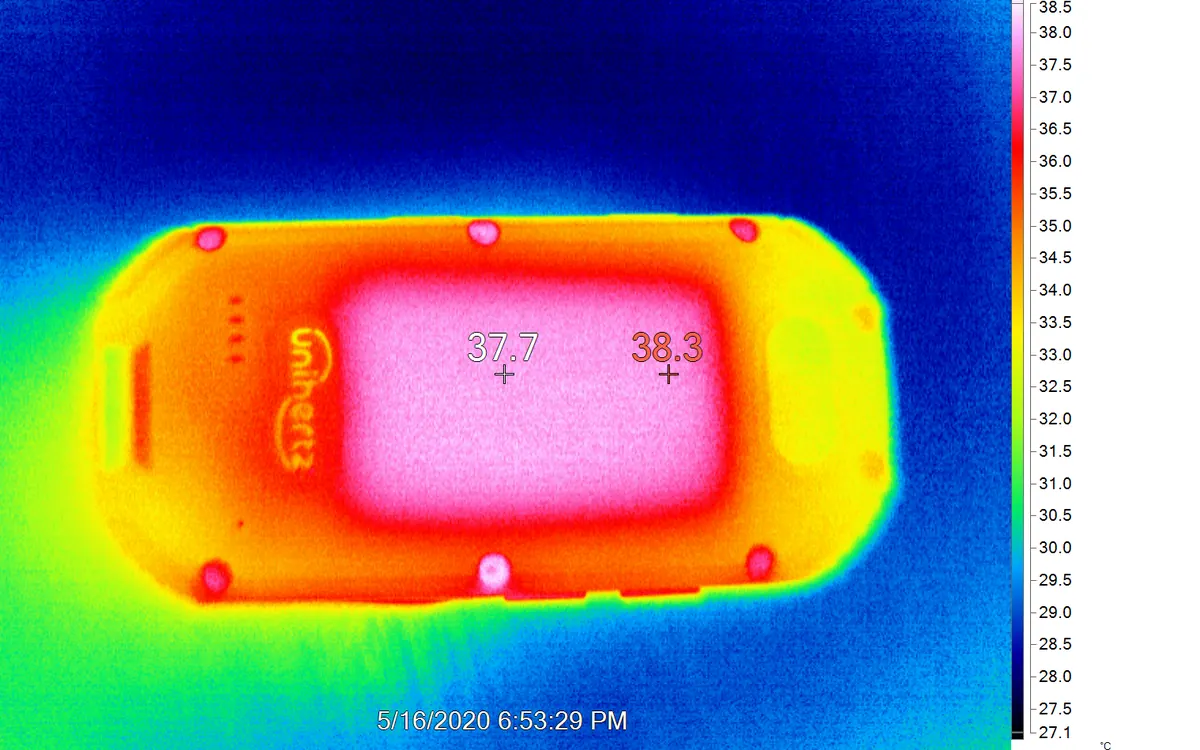
Almost every phone gets warm. A modern smartphone packs a powerful processor, a lithium-ion battery and several radios into a sealed glass-and-metal slab with no fan, so the only way to get rid of heat is through its body. That's why the back or frame warms up when you push it.
The question is whether your phone is warm or overheating. This guide explains the difference, the usual causes, and what you can do about it.
Warm vs overheating: how to tell
Normal warmth: the phone feels warm, sometimes quite warm, during fast charging, a long gaming session, satellite navigation, a video call or recording 4K video. It cools down within minutes once you stop.
Overheating is when one or more of these happens:
- the phone is uncomfortable to hold;
- you see a temperature warning, or the phone refuses to charge, turns off the flash or dims the screen;
- performance drops sharply: games stutter, the camera closes, apps lag;
- it gets hot while idle in your pocket or on a table.
Phones protect themselves. When they get too hot, the system lowers processor speed (this is called thermal throttling), dims the display, pauses charging and, as a last resort, shuts down. Apple, for example, lists an operating ambient temperature of 0–35 °C for iPhone; other makers publish similar ranges.
The most common causes
1. Charging, especially fast or wireless
Charging a battery always produces heat, and fast charging produces more. Wireless charging is less efficient than a cable, so more energy turns into heat, and a misaligned phone on a pad gets warmer still. Using the phone heavily while it charges stacks two heat sources on top of each other.
2. Demanding apps and games
3D games, video editing, long camera sessions and on-device AI features keep the processor and graphics at high load. Even flagship chips throttle under sustained load; short benchmarks don't show it. That's why reports such as the recent Snapdragon overheating claims focus on long, heavy workloads.
3. Weak signal and 5G
When reception is poor, the modem boosts its transmit power and keeps searching for a better tower. Basements, trains and rural areas can make a phone warm even when you aren't touching it. Using mobile hotspot adds even more load.
4. Heat and sunlight
A phone on a car dashboard, a beach towel or a sunny café table can heat up quickly even with the screen off. Add navigation and charging in a hot car and throttling is almost guaranteed.
5. Thick cases
A case doesn't make heat, but a thick rugged or leather case traps it, especially during charging.
6. Software problems
A buggy update, a misbehaving app stuck in the background, or (less often) malware can keep the processor busy all the time. The tell-tale sign is heat plus fast battery drain while you aren't using the phone. Malicious clones of popular apps do this; see how to spot fake apps on Google Play.
7. An ageing or damaged battery
Older batteries have higher internal resistance and get warmer when charging. A damaged or swollen battery is a safety issue, covered below.
10 fixes that actually help
- Stop and let it cool. Close the game or camera, lock the screen and put the phone on a hard surface in the shade.
- Take the case off while charging or gaming.
- Don't use heavy apps while charging. If you need to, use a slower charger or cable.
- Use a decent charger and cable. A certified USB PD charger negotiates the right power; a cheap no-name adapter may not. Our USB-C charger guide explains what to look for.
- Align wireless chargers properly, or switch to a cable on hot days.
- Never cool it in the fridge or freezer. Rapid temperature changes can cause condensation inside the phone. Just let it cool at room temperature.
- Check battery usage in Settings. An app using lots of battery in the background is often the source of heat; update, restrict or uninstall it.
- Install system and app updates. Makers regularly fix thermal and battery bugs.
- Lower the load: reduce screen brightness, cap game frame rates, and switch off 5G or hotspot when signal is poor.
- Restart the phone. It clears stuck processes, and it's quick.
On the go, the same rules apply to power banks: they warm up too, so don't stack the phone and battery in a hot pocket. See our power bank buying guide.
Does heat damage the phone?
Short bursts of heat are normal and the protections exist for that reason. Long-term, though, heat ages lithium-ion batteries faster. A phone that regularly sits hot while charging overnight under a pillow or in direct sun will lose battery capacity sooner. Many phones now offer optimised or limited charging (for example, stopping at 80%) that reduces time spent at full charge and heat stress; it's worth turning on.
Frequently asked questions
Why does my phone get hot while charging?
Charging always produces heat, and fast or wireless charging produces more. It gets worse if you use the phone at the same time, keep a thick case on, or charge in a warm place. Take the case off and avoid heavy apps while charging.
Is it normal for a phone to get hot when gaming?
Getting warm is normal; the chip and graphics are at full load. If it becomes uncomfortable to hold or the game starts stuttering, the phone is throttling. Take breaks, remove the case and lower graphics settings or frame rate.
Can I put an overheating phone in the fridge?
No. Fast cooling can cause condensation inside the phone. Turn off heavy apps and let it cool at room temperature in the shade.
Why is my phone hot when I'm not using it?
Usually a background app, a bad update, poor signal or a sync job. Check battery usage in Settings, update apps and the system, and restart. If it continues, back up and contact support.
Can a phone explode from overheating?
It is rare, but damaged or swollen lithium-ion batteries can catch fire. Built-in protections shut the phone down before it gets dangerous; if you see swelling or smell burning, stop using it and get it inspected.
More from Smartphones
View all →Read next

‘Stupendously large’ black holes can’t be most of dark matter, study finds
Black holes heavier than whole galaxies would leave a grainy imprint on the cosmic microwave background. It isn't there, so they can't be a major part of dark matter.

Cyberpunk 2077 update 2.5: dual wielding, mods and an Edgerunners 2 gig
CD Projekt Red's free Edgerunners 2 Update (2.5) adds dual-wielded pistols, cross-platform mods via mod.io, cyberware styling and a prequel quest to the new anime.
How to buy a used graphics card safely: a 2026 checklist
How to buy a used graphics card without getting burned: where to buy, fair prices, seller questions, physical checks, stress tests, fake GPUs and warranty.