Google's Pause Point reaches OnePlus phones on ColorOS 17
Android's anti-doomscrolling tool Pause Point, once pitched as Pixel-only, has turned up on a OnePlus 13R running the ColorOS 17 beta. Here's how it works.
LandGadget Newsroom · · 3 min read
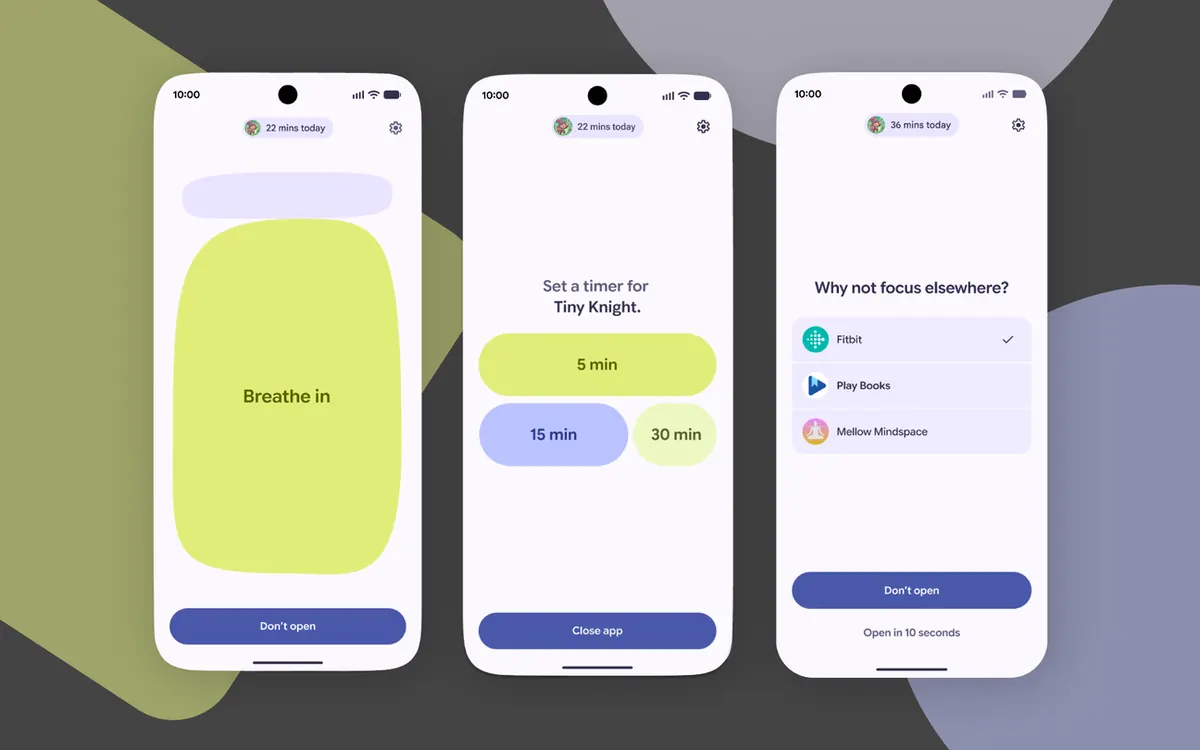
Pause Point, Google's Digital Wellbeing tool for cutting down on doomscrolling, is no longer just a Pixel feature. Android Authority says it has confirmed access to Pause Point on a OnePlus 13R running the ColorOS 17 beta, the first sign of the feature on a phone with its own Android skin, the site reports.
From Pixel 11 exclusive to wider rollout
Google announced Pause Point in May, around Google I/O. For a while it looked like a Pixel 11 exclusive, then Android 17 QPR1 brought it to other Pixel phones. Google's support documents still say Pause Point "is available on Pixel 11 series running Android 17 and later", but seeing it on a OnePlus phone suggests it's heading to Android 17 devices that have Digital Wellbeing more broadly.
That doesn't mean every phone will get it soon. Each manufacturer controls its own update schedule, and OnePlus users will need ColorOS 17, which is still in beta for some models.
How Pause Point works
Instead of locking you out of an app after a time limit, Pause Point adds a bit of friction:
- Pick your distracting apps. You choose which apps should trigger it.
- A 10-second breather. When you open one of them, Android pauses for about ten seconds and asks why you're there.
- Something else to do. During the pause you can follow a short breathing exercise, look at favourite photos, set a timer for the session, or jump to a suggested alternative app such as an audiobook.
- Hard to switch off on impulse. According to Google's description at launch, turning the feature off requires restarting the phone, so you can't undo your good intentions with one tap.
Why it matters
Android already has app timers and Focus mode, but those block apps outright, and many people simply turn them off. Pause Point is a gentler nudge built into the system, and bringing it beyond Pixels would put it in front of far more people.
Frequently asked questions
Which phones have Pause Point?
Officially, Google lists the Pixel 11 series on Android 17. Android 17 QPR1 also brought it to other Pixels, and Android Authority has now seen it on a OnePlus 13R running the ColorOS 17 beta.
Does Pause Point block apps?
No. It adds a short pause of about ten seconds before a distracting app opens and offers alternatives, but you can carry on into the app.
Can I turn Pause Point off?
Yes, but Google said at launch that disabling it requires restarting the phone, which is meant to stop you switching it off on impulse.
ColorOS 17 brings plenty more besides: see our look at OPPO's ColorOS 17 launch. For other built-in Android protections worth turning on, read about the new scam shields in Google Messages.
More from Smartphones
View all →Read next

Switch Sports Resort lands Oct 22: what's in all 12 sports
The Switch 2 exclusive Switch Sports Resort arrives on 22 October with 12 motion-control sports on Wuhu Island, including Skateboarding and Thumb Wrestling.

ALMA's 'cosmic hamburger' shows how giant planets may form
ALMA slices the edge-on disk known as Gomez's Hamburger into layers of gas and dust and spots a clump that may be a giant planet in the making. What it shows.
UGREEN ID500 Pro is a Matter camera that records locally
UGREEN's 4K pan-tilt ID500 Pro streams and moves over Matter 1.5.1 and records to its new HomeAgent hub. Early-bird prices, what it needs and when it ships.