How to buy a used graphics card safely: a 2026 checklist
How to buy a used graphics card without getting burned: where to buy, fair prices, seller questions, physical checks, stress tests, fake GPUs and warranty.
LandGadget Newsroom · · 7 min read
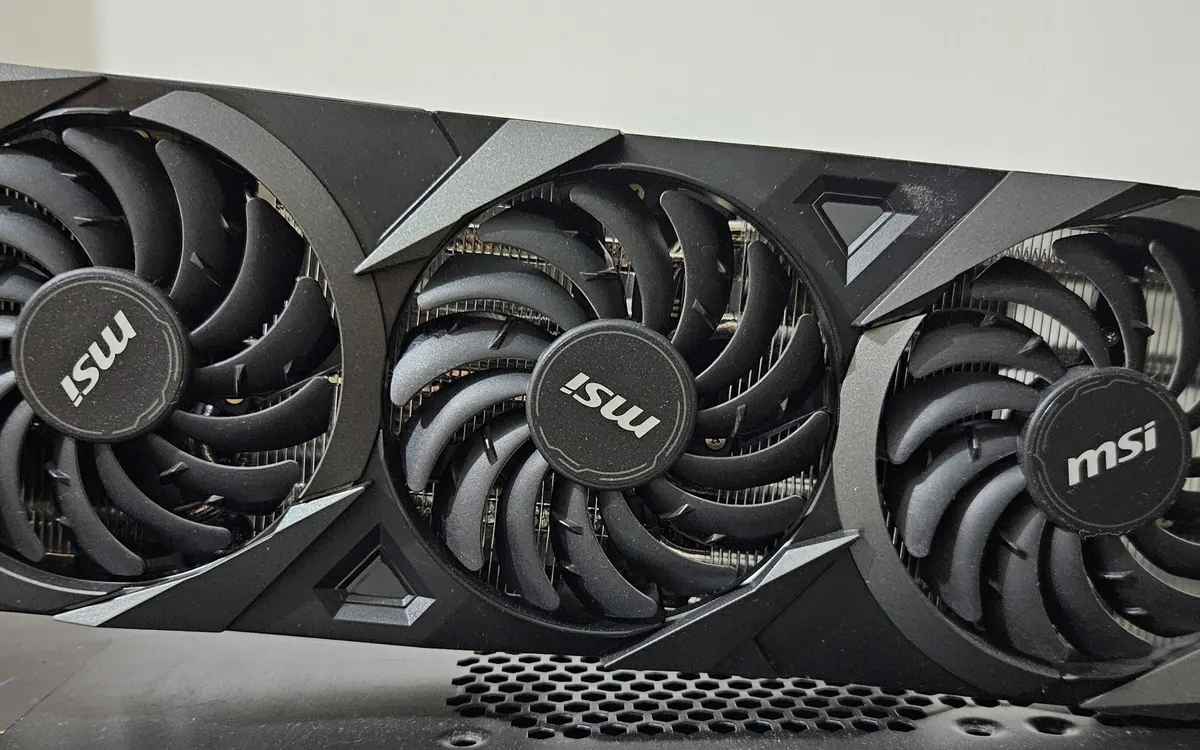
A used graphics card is one of the best ways to save money on a gaming or AI PC. GPUs have no moving parts apart from their fans, and a healthy card can run for many years. The risk is not so much wear as people: scams, fake cards, hidden faults and cards with a murky history. Stories like the missing pallets of RTX 5090s at São Paulo airport are a reminder that high-end GPUs are worth stealing and reselling.
This guide is the step-by-step checklist we would follow. If you are still deciding which card to buy, start with our graphics card buying guide and come back here once you have a shortlist.
Decide whether used makes sense
A used card is worth it when the saving is real after you account for what you give up: a full warranty, the newest features and an easy return. Compare three prices:
- the new price of the same card (or its current-generation equivalent),
- completed sales of the same model on marketplaces (not asking prices, which are often wishful),
- the price of a refurbished card from a retailer or the manufacturer, which usually includes some warranty.
If a used card costs nearly as much as a new one with warranty, buy new. If the price is far below completed sales, treat it as a red flag rather than a bargain.
Choose where to buy
Where you buy matters more than which listing looks best.
| Marketplace with protection | Local pickup | Refurbished retailer | |
|---|---|---|---|
| Can you test first? | Usually not, but returns are possible | Yes, if the seller agrees | No, but returns are easy |
| Buyer protection | Yes, if you pay through the platform | Little or none | Retailer return policy |
| Typical warranty | Remaining factory warranty, if any | Remaining factory warranty, if any | Often a retailer warranty |
| Main risk | Shipping damage, scams outside the platform | Cash scams, no recourse | Higher price |
Rules that apply everywhere:
- Pay through the platform or with a method that offers chargeback protection. Never use bank transfers, gift cards, crypto or "friends and family" payments for a stranger.
- Keep the conversation on the platform. A seller who pushes you to WhatsApp or email to "save fees" is the most common scam pattern.
- For local deals, meet somewhere you can plug the card in, such as the seller's PC or a repair shop.
Questions to ask the seller
Good sellers answer these without fuss:
- Why are you selling it? An upgrade is a normal answer.
- How was it used? Gaming, video work, AI training or crypto mining.
- Has it been repaired, opened or modded? Repasting is fine if done well; a flashed BIOS or reballed memory is a bigger question.
- Do you have the original receipt and box? The receipt is often needed for warranty claims.
- Can you send a photo of the card with your username and today's date on a piece of paper, plus a photo of the serial number sticker?
Check the serial number with the manufacturer's warranty page where possible. Some brands transfer warranty to a second owner and some do not, so read the policy for your brand and region.
Mining cards: not automatically bad
Cards used for crypto mining or long AI jobs ran for many hours, but often at steady temperatures and reduced power, which is gentler than you might expect. The parts most likely to be worn are the fans and the thermal paste and pads, which can be replaced. What matters more is how the card was cooled and whether its BIOS was modified. Ask, and price the card accordingly.
Inspect the card in person
Before it goes anywhere near your PC, look closely:
- Power connectors: look for browned plastic, melted pins or a deformed plug. This matters most on cards that use the 12VHPWR / 12V-2x6 connector. Any heat damage is a dealbreaker.
- PCIe slot contacts: gold fingers should be clean and unscratched.
- Fans: spin them by hand. They should turn smoothly and quietly without wobbling.
- Screws and stickers: missing screws, stripped heads or a damaged "warranty void" sticker mean the card has been opened.
- Board and backplate: look for corrosion, bent heatsink fins, sagging, or a smell of burnt electronics.
- Weight and labels: compare the card with official photos. A cheap card dressed up in a high-end shroud is a known scam.
Test it under load
A card that shows a desktop image is not proven healthy. Ask to see it run, or test it as soon as it arrives and well within any return window.
- Identify it. Install GPU-Z (free) and check the GPU name, memory size, memory type and bus width against the official specifications. Fake cards are often older chips with a modified BIOS that reports a newer model name; GPU-Z, which reads the hardware, and a performance test usually expose them.
- Install a clean driver from Nvidia, AMD or Intel.
- Stress it. Run a demanding benchmark loop such as 3DMark's stress test, Unigine Superposition or a heavy game for at least 20–30 minutes.
- Watch for problems: artifacts (coloured dots, lines or flickering), driver crashes, black screens, sudden reboots or fans that rev up and down wildly.
- Watch temperatures with GPU-Z or HWiNFO. Compare them with reviews of the same model; much higher temperatures usually mean dried paste or dusty heatsinks.
- Compare performance with published benchmark results for the same card. A big shortfall points to a fake, a throttling cooler or a weak power supply.
Some coil whine (a faint buzzing under load) is normal on many cards and is not a fault in itself.
Make sure it fits your PC
A used card does not come with a return policy if it does not fit. Before you buy, check the length and slot thickness against your case, the power connectors and recommended power supply wattage, and whether you need an adapter. Our GPU guide covers these checks in detail.
After you buy
- Save the listing, chat, receipt and serial number photos. If the card turns out to be stolen or faulty, you will need them.
- If you received it by post, film the unboxing. It helps with "box of bricks" disputes.
- Register the card with the manufacturer if it still has warranty.
- Consider a fan clean and repaste if temperatures are high, but only if you are comfortable doing it, as opening the card can affect warranty with some brands.
Frequently asked questions
Is it safe to buy a used graphics card?
Yes, if you buy with buyer protection, see it working under load or test it within the return window, and check it for physical damage. Most risk comes from scams, not wear.
How can I tell if a graphics card is fake?
Check the GPU name, memory size and bus width in GPU-Z against official specifications, then compare benchmark results with reviews. Fakes are often older chips with a modified BIOS.
Should I avoid ex-mining graphics cards?
Not automatically. Fans and thermal paste are the parts most likely to be worn, and both can be replaced. Ask how the card was cooled and whether its BIOS was modified.
Does the warranty transfer to a second owner?
It depends on the brand and region. Some manufacturers honour warranty for the card's serial number regardless of owner, others need the original receipt or the first buyer.
What is a red flag in a used GPU listing?
A price far below recent completed sales, stock photos only, a seller who wants payment outside the platform, and refusing to show the card running.
More from Computers & AI
View all →Read next

Cyberpunk 2077 update 2.5: dual wielding, mods and an Edgerunners 2 gig
CD Projekt Red's free Edgerunners 2 Update (2.5) adds dual-wielded pistols, cross-platform mods via mod.io, cyberware styling and a prequel quest to the new anime.
How to spot fake apps on Google Play before you install
Fake WhatsApp, Chrome and banking apps keep slipping onto Google Play. Learn the checks that expose a clone: developer, downloads, reviews, ads, permissions, Play Protect.
Seattle will add up to 200 curbside EV chargers by 2030
Seattle is letting residents pick sites for up to 200 new curbside Level 2 EV chargers near apartments, with installs from fall 2027 to 2030.