How to choose a tablet in 2026: iPad, Android or Windows?
Tablet buying guide 2026: iPad vs Android vs Windows, screen size, OLED vs LCD, RAM and storage, stylus and keyboard costs, cellular and software updates.
LandGadget Newsroom · · 8 min read
Quick verdictPick the platform first (your phone and apps decide it), then the size you'll actually carry, then enough storage and update support to last four or five years.
Jump to the verdict ↓On this page
A tablet is the gadget people most often buy on a whim and then use for years. That makes the boring details, like storage, update support and what the accessories cost, more important than the launch-day headline. This guide walks through the decisions in the order that matters.
Step 1: choose the platform
Most people should start with the phone they already have and the apps they rely on.
| iPad (iPadOS) | Android tablet | Windows tablet | Amazon Fire | |
|---|---|---|---|---|
| Best for | iPhone owners, creative apps, long support | Android phone owners, wide price range | Full desktop software | Cheap video, reading, kids |
| App store | App Store, strong tablet apps | Google Play, fewer tablet-optimised apps | Any Windows program | Amazon Appstore only |
| Stylus | Apple Pencil, sold separately | Often included with Samsung Galaxy Tab S | Varies by model | Limited |
| Storage expansion | No | microSD on many models | Varies | microSD on most models |
- iPad makes the most sense if you use an iPhone or Mac: AirDrop, iMessage, shared passwords and Continuity just work. The App Store also has the deepest catalogue of apps designed for tablets, especially for drawing, music and video editing.
- Android tablets pair best with Android phones and range from under $150 to flagship prices. Samsung's Galaxy Tab S line is the strongest premium option; Google Play has fewer apps that are properly laid out for big screens, though the main ones are fine.
- Windows tablets such as 2-in-1s with detachable keyboards run full desktop programs. That's ideal if you need specific Windows software, less so if you mainly want to watch videos on the sofa.
- Amazon Fire tablets run Fire OS, which is based on Android but ships with Amazon's own app store instead of Google Play. They are cheap and fine for streaming, reading and kids, but app choice is limited.
Step 2: pick a size you'll actually carry
Screen size changes how you use a tablet more than anything else.
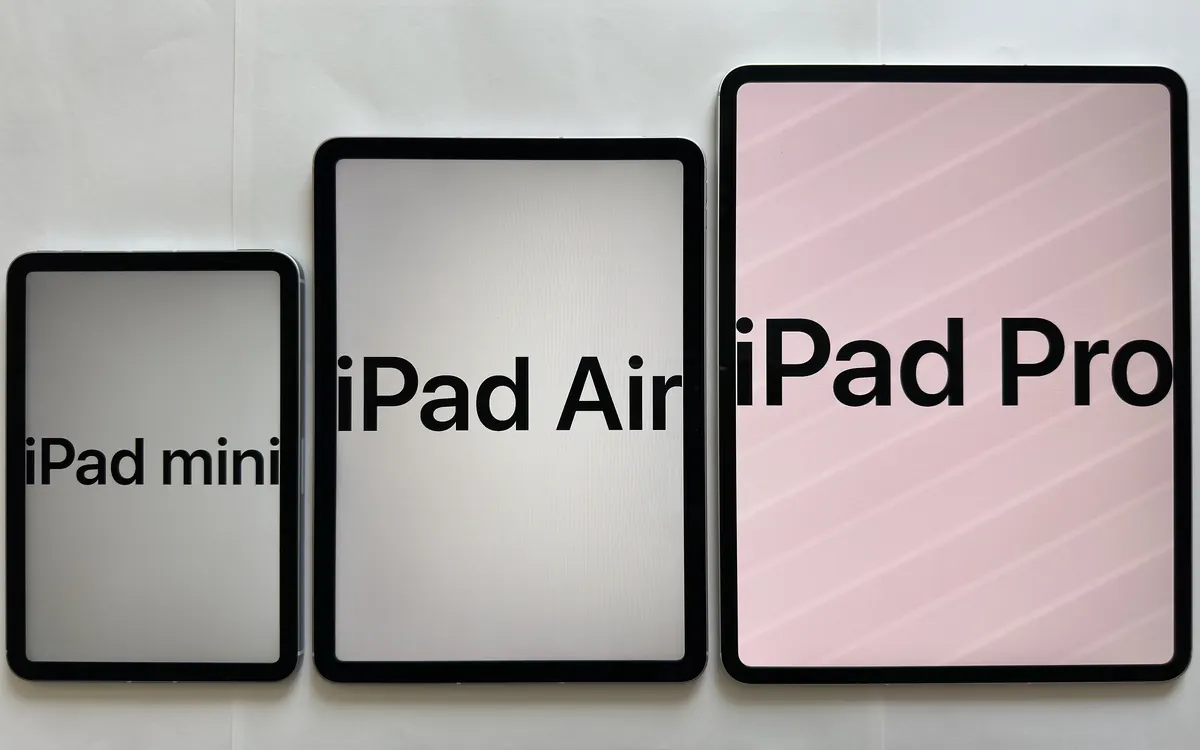
- 8–9 inches (compact): fits in a jacket pocket or small bag and can be held in one hand. Great for reading, travel and as a car or cockpit screen. Apple's new OLED iPad mini is the best-known example at 8.5 inches.
- 10–11 inches (standard): the default for most people. Big enough for split-screen and note-taking, still comfortable in bed.
- 12–14.6 inches (large): a laptop replacement for drawing, editing and serious multitasking, but heavy to hold and awkward to travel with.
If you can, hold one in a shop for a few minutes. Weight in the hand is the thing spec sheets don't convey.
Step 3: the display
- OLED gives true blacks and high contrast, which makes films and HDR content look much better. It is increasingly common on premium tablets.
- LCD (including mini-LED) is cheaper and perfectly good for reading and browsing.
- Refresh rate: 90 Hz or 120 Hz makes scrolling and stylus input feel smoother. A 60 Hz screen is fine for video and reading.
- Anti-glare (matte) options, such as Apple's nano-texture glass, help outdoors but add cost.
Step 4: chip, RAM and storage
For streaming, browsing and email, almost any current tablet chip is enough. Pay for performance only if you edit video, draw with complex brushes, game or run AI features on the device.
RAM matters more for multitasking and on-device AI. Budget tablets with 4 GB are fine for one app at a time; 8 GB or more is a sensible floor for a tablet you'll keep for years, and many on-device AI features now require it. Our guide to how much RAM you need explains the trade-off in more detail.
Storage is the most common regret. Treat 128 GB as the minimum if you download films for travel, keep games installed or record video; 64 GB fills up quickly. iPads can't be expanded later, while many Android and Fire tablets take a microSD card, which is the cheapest way to add space for media.
Some tablets also tie features to storage size. On the new iPad mini, for example, only the 512 GB model gets the full-strength chip, so read the spec page for each configuration.
Step 5: accessories change the real price
A keyboard and stylus can add a third or more to the cost of a tablet:
- Apple sells the Pencil separately: Apple Pencil (USB-C) costs $79 and Apple Pencil Pro $129 in the US. Keyboard cases are extra too.
- Samsung has traditionally included the S Pen in the box with its Galaxy Tab S models, which is a real saving; check the listing for the model you're buying.
- Make sure a stylus is compatible with your exact model; not every pen works with every tablet from the same brand.
Budget for a case as well. Tablets are thin slabs of glass and many owners drop them at least once.
Step 6: Wi-Fi or cellular
Most people are fine with Wi-Fi only and their phone's hotspot. A cellular model makes sense if you work on trains, travel often or want maps without tethering, but it costs more upfront and needs a data plan. Many cellular tablets now use eSIM; our eSIM explainer covers how to add and move plans. For home use, a tablet with Wi-Fi 6E or Wi-Fi 7 only helps if your router supports it too.
Step 7: software updates and lifespan
Updates decide how long a tablet stays safe and useful. Apple has historically supported iPads with new iPadOS versions for many years. Android makers publish their own policies, and they vary widely between brands and price tiers. When a tablet reaches the end of its support, it stops getting new features and, later, security fixes; see what that means in practice in our story on the Galaxy Tab S9's final Android update.
Before you buy, look up the manufacturer's stated update period for the exact model, and count from its launch date, not the day you buy it.
Step 8: charging and battery
Nearly all current tablets charge over USB-C, so one charger can serve your phone, tablet and laptop. Check the maximum charging wattage and whether a charger is included; our USB-C charger guide explains which wattage to buy. Manufacturers' battery claims are usually measured with video playback or web browsing at fixed brightness, so treat them as a best case.
Special cases
- For kids: look for parental controls, a sturdy case and a model you won't mind being dropped. Cheap tablets with good parental tools usually beat expensive ones.
- For reading only: an E Ink e-reader is lighter, easier on the eyes in sunlight and lasts weeks per charge.
- For laptop replacement: compare a large tablet plus keyboard with an actual laptop at the same total price. If you need file management, multiple windows and desktop apps every day, a laptop may serve you better; our laptop guide for local AI covers what to look for.
+ Pros
- Lighter and more portable than a laptop
- Excellent for video, reading, drawing and video calls
- Long battery life and instant-on use
− Cons
- Keyboard and stylus often cost extra
- Storage usually can't be upgraded (except microSD on some models)
- Less flexible than a laptop for desktop software and file handling
Frequently asked questions
Is an iPad or an Android tablet better?
If you use an iPhone or Mac, an iPad usually fits better and has the strongest tablet app catalogue. If you use an Android phone or want a lower price or microSD storage, an Android tablet such as a Samsung Galaxy Tab is the better match.
How much storage does a tablet need?
128 GB is a sensible minimum for most people. Choose more if you download a lot of films, keep large games installed or record video. Android tablets with a microSD slot can be expanded cheaply later.
What size tablet should I buy?
8 to 9 inches for one-handed reading and travel, 10 to 11 inches as an all-rounder, and 12 inches or more if you want a laptop replacement for drawing or editing.
Do I need a cellular tablet?
Only if you often work away from Wi-Fi and don't want to use your phone's hotspot. Cellular models cost more and need a data plan, often via eSIM.
How long will a tablet get updates?
It depends on the maker. Check the manufacturer's stated update period for the exact model and count from its launch date, not your purchase date.
Our verdict
Platform first, then size, then storage and update support
Let your phone and apps decide the platform, hold a few sizes to find the one you'll really carry, and spend on storage and update support rather than peak performance you won't use. Add the price of a keyboard, stylus and case before comparing deals.
More from Computers & AI
View all →Read next
Samsung reportedly cuts Galaxy A output 20% on memory costs
ETNews says Samsung is cutting Galaxy A production by about 20%, roughly 10 million phones, to favour flagships as memory and chip costs squeeze margins.

NASA's PACE satellite tracks fall foliage colour worldwide
NASA's PACE satellite maps fall leaf colour across the planet every day or two. How its hyperspectral OCI sensor sees reds and yellows, and how you can help.

Lidar vs cameras for self-driving cars: which is better?
Lidar vs cameras vs radar: how each self-driving sensor works, why Tesla uses cameras only while Waymo, Mercedes and the Rivian R2 add lidar, and what it means.