What is eSIM? How it works, switching phones and travel
eSIM explained in plain English: how a digital SIM works, how to check if your phone supports it, how to move it to a new phone and how to use a travel eSIM abroad.
LandGadget Newsroom · · 6 min read
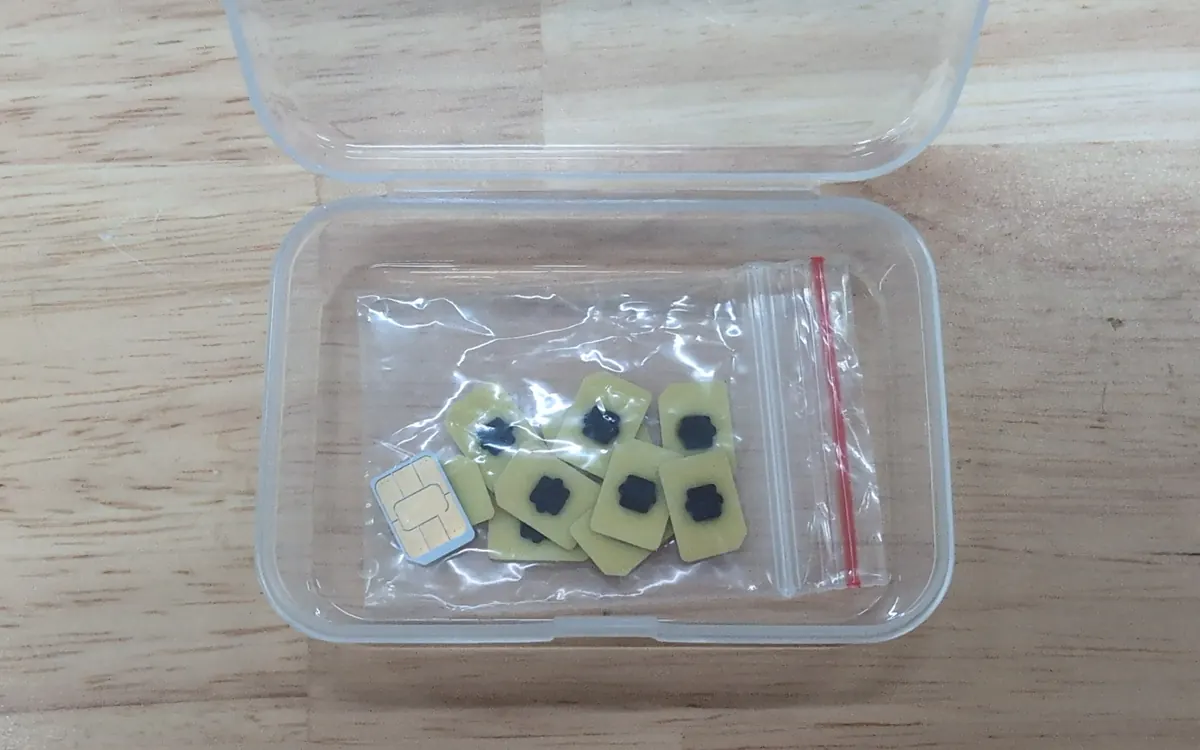
For about thirty years, a phone number lived on a piece of plastic. More and more phones now skip it. Apple has sold eSIM-only iPhones in the US since the iPhone 14, and its iPhone Air has no SIM tray in any country. Most new Android flagships, smartwatches and tablets support eSIM too. Here's what it is, how to use it, and the few things to watch out for.
What an eSIM actually is
A classic SIM card is a tiny computer that proves to your carrier who you are. An eSIM ("embedded SIM") does the same job, but the chip, called an eUICC, is built into the phone. It's too small to see and can't be removed (the cards in our photo are the same chip type in a removable form). Instead of mailing you a card, the carrier sends a profile, a small digital package with your number and credentials, which the phone downloads and installs.
The process follows standards from the GSMA, the mobile industry body, so it works the same way across brands and carriers. Most eSIM phones can store several profiles and keep one or two active at a time. That makes "dual SIM" easy: a work and a personal number, or your home number plus a local data plan abroad.
eSIM vs physical SIM
| eSIM | Physical SIM | |
|---|---|---|
| How you get it | QR code, carrier app or activation code | Card from a shop or by post |
| Switching phones | Transfer in settings or reissue from the carrier | Move the card to the new phone |
| Several numbers | Several profiles stored, usually 1–2 active | One per slot |
| If the phone is stolen | Can't be pulled out and used elsewhere | Can be removed and put in another phone |
| Using an old phone | Needs eSIM support | Works in almost any phone |
Does my phone support eSIM?
- Settings: on an iPhone, look for Settings → Mobile Service (or Cellular) → Add eSIM. On Android, look under Settings → Network & internet → SIMs, or Connections → SIM manager on Samsung phones.
- Dial *#06#: if the screen shows an EID (a long number) next to the IMEI, the phone has an eSIM chip.
- Region matters: some models sold in certain markets, including some sold in China, ship without eSIM, even when the same phone has it elsewhere.
- Carrier locks: a phone locked to one carrier may refuse profiles from other carriers. Ask for an unlock first.
How to get an eSIM from your carrier
- Check that your carrier offers eSIM for your plan. In Ukraine, Kyivstar, Vodafone and lifecell all do; most large carriers in Europe and North America do too.
- Request it in the carrier's app, on its website or in a store. You'll usually need ID, as with a new SIM card.
- Install it: scan the QR code, tap the link in the carrier app or type the activation code. Do this on Wi‑Fi, because the phone has to download the profile.
- Label the line (for example "Personal" or "Travel") and choose which one handles calls, texts and mobile data.
Moving your eSIM to a new phone
There's no card to swap, so the move happens in software. Both iOS and recent Android versions offer a built-in transfer during setup or in SIM settings, where the carrier supports it. You move the line from the old phone, confirm it, and it's activated on the new one. If transfer isn't supported, request a new eSIM from the carrier for the new device.
Two rules save a lot of trouble:
- Don't erase or reset the old phone until the new one has signal, can make calls and receives SMS, especially the codes your banking apps send.
- Changing ecosystems (iPhone to Android or the other way round) usually works best by asking the carrier to reissue the eSIM.
Using eSIM when you travel
This is where eSIM shines. Before a trip you can buy a travel eSIM, usually a data-only plan from a local carrier or a reseller, and install it at home. When you land, switch mobile data to the travel line. Your home number can stay active for calls and texts on the same phone.
Tips:
- Turn off data roaming on your home line so it doesn't use expensive data in the background.
- Travel eSIMs usually give you data only, without a local number. Messaging apps still work.
- Install it before you leave, but check when the plan's validity starts. Some start counting from installation, others from first use abroad.
Security and privacy
An eSIM can't be removed from a stolen phone and put into another one, which makes the thief's job harder. It doesn't protect you against SIM-swap fraud, where a criminal convinces your carrier to move your number to their device. For that, set a carrier account PIN or password, and prefer an authenticator app or passkeys over SMS codes for important accounts.
The downsides
- Not every device supports it, especially cheaper or older phones and some regional models.
- Moving between phones depends on carrier support and can need a call to support or a visit to a store.
- Repairs: if a phone dies completely, you can't just move the SIM to a spare. You'll need the carrier to reissue the profile.
Related reading
eSIM is behind newer features such as Apple's iPhone Handoff, which shares one number across two iPhones. Satellite messaging is another way to stay reachable without a mobile signal. See our story on Pixel 9 Satellite SOS staying free.
Frequently asked questions
Is eSIM better than a physical SIM?
For most people, yes: it's quicker to set up, harder to steal and makes dual SIM and travel plans easy. A physical SIM is still handier if you often move your number between phones or use older devices without eSIM.
Can I have an eSIM and a physical SIM at the same time?
On most dual-SIM phones that have a SIM tray, yes. The phone treats them as two lines and lets you choose which one handles calls, texts and data.
What happens to my eSIM if I factory-reset my phone?
A reset can erase eSIM profiles unless you choose to keep them. Some phones ask; others don't. If the profile is lost, your contract still exists, but you'll need the carrier to issue a new eSIM.
Does an eSIM work in any country?
The eSIM chip works worldwide, but each profile belongs to a carrier. Abroad your home profile roams like a normal SIM, or you can add a travel eSIM with local data.
More from Smartphones
View all →Read next
VW battery recall now covers 72,700 ID. EVs worldwide
Volkswagen is recalling about 72,700 ID.3, ID.4, ID.7, ID. Buzz and Cupra Born EVs over faulty battery cells. Which cars are affected and what owners should do.

OpenAI's GPT-6 models are coming to Google Cloud
GPT-6 Astra, GPT-6.1 Sol and GPT-6 Luna are entering private preview in Google Cloud's model garden. OpenAI models will now be on all three big US clouds.
Aqara Outdoor Plug H2 EU: Thread or Zigbee mode?
Aqara's €32.99 IP44 outdoor plug runs on Thread (Matter, no hub) or Zigbee (Aqara hub, more features). Here is what each mode gives you and which to pick.