DDR4 vs DDR5 RAM: differences, compatibility and which to buy
DDR4 or DDR5? How speed, latency, voltage and price compare, which CPUs and motherboards support each, why they aren't interchangeable, and when DDR4 still makes sense.
LandGadget Newsroom · · 8 min read
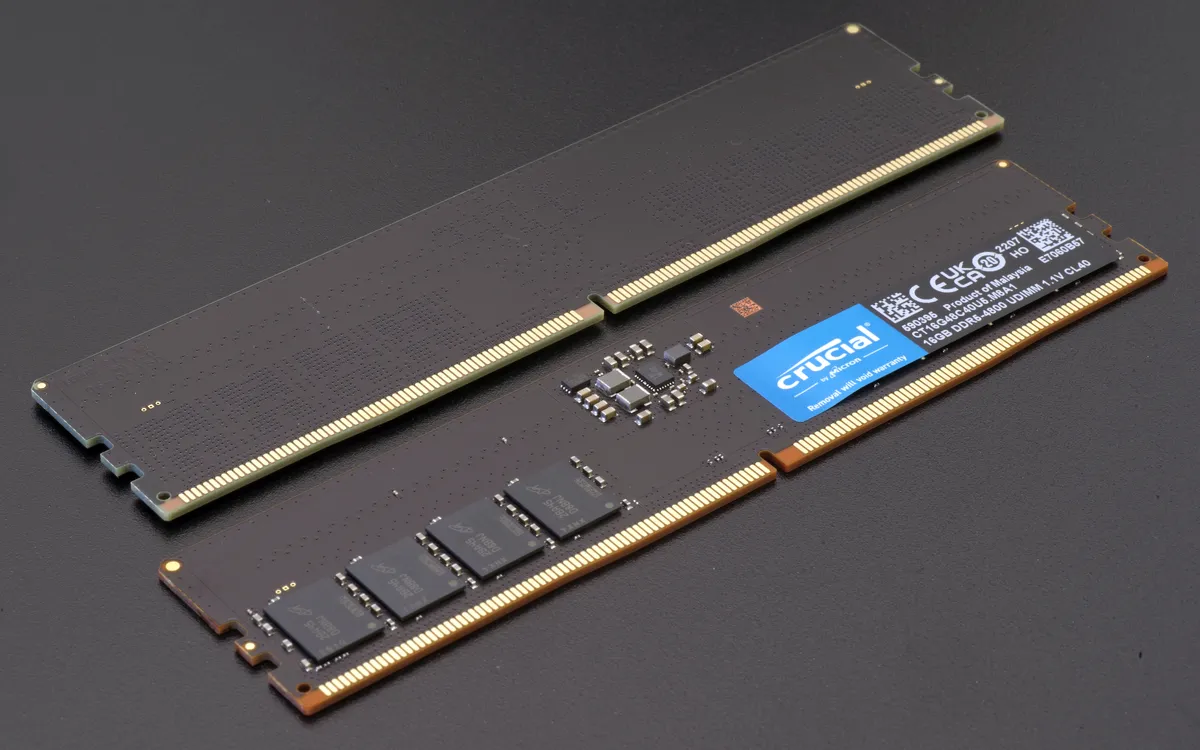
Quick verdictFor a new PC, buy DDR5: every current desktop platform from AMD and Intel requires it. DDR4 only makes sense if you're upgrading a PC that already uses it.
Jump to the verdict ↓On this page
DDR5 has been on the market since 2021, yet DDR4 is still sold everywhere, often for less. So which one should you buy? In most cases your motherboard has already made the choice for you, because the two generations are not interchangeable. This guide explains what actually changed between DDR4 and DDR5, which platforms use which, and when buying DDR4 in 2026 still makes sense.
If you are still deciding on capacity, start with our guide to how much RAM you need. Capacity matters more than generation for day-to-day speed.
The short answer
- Building a new desktop: DDR5. AMD's AM5 platform (Ryzen 7000, 8000 and 9000) and Intel's LGA 1851 platform (Core Ultra 200S) support DDR5 only.
- Upgrading an existing PC: buy whatever your motherboard already uses. A DDR4 board can't take DDR5, and vice versa.
- Buying a laptop: you usually don't choose. Most thin laptops use soldered LPDDR5 or LPDDR5X, so pick enough capacity up front.
DDR4 vs DDR5 at a glance
| DDR4 | DDR5 | |
|---|---|---|
| Standard speeds (JEDEC) | 1,600–3,200 MT/s | 4,800 MT/s and up; 5,600–6,400 MT/s are common today |
| Typical retail kits | 3,200–3,600 MT/s | 5,600–6,400 MT/s, faster enthusiast kits available |
| Operating voltage | 1.2 V | 1.1 V (higher for overclocked XMP/EXPO kits) |
| Channels per module | One 64-bit channel | Two independent 32-bit sub-channels |
| Power management | On the motherboard | On the module (PMIC chip) |
| On-die ECC | No | Yes (internal only, not the same as ECC RAM) |
| Desktop module capacities | Usually 8–32 GB | 16–64 GB, including 24 and 48 GB sizes |
| Platforms | AMD AM4, Intel up to 14th gen | AMD AM5, Intel 12th gen and later |
What actually changed in DDR5
Bandwidth. DDR5 starts where DDR4 ended. Entry DDR5-4800 already moves 50% more data per second than DDR4-3200, and DDR5-6000 almost doubles it. Each DDR5 module is also split into two independent 32-bit sub-channels, which helps the memory controller handle many small requests at once, the kind modern multi-core CPUs generate.
Latency. DDR5 kits list much higher CAS latency numbers (CL30–CL40 versus CL14–CL18 for DDR4). That looks worse but isn't, because each clock cycle is shorter. The real delay in nanoseconds is roughly CL × 2000 ÷ speed:
- DDR4-3200 CL16 ≈ 10 ns
- DDR5-6000 CL30 ≈ 10 ns
- DDR5-4800 CL40 ≈ 16.7 ns
So a good DDR5-6000 kit matches fast DDR4 on latency and beats it easily on bandwidth. Cheap DDR5-4800 modules are slower to respond, which is why early DDR5 reviews were mixed.
Power delivery and capacity. DDR5 modules have their own power management chip (PMIC) and run at a lower base voltage. Denser memory chips also allow larger modules. 48 GB sticks are common, which makes 96 GB in two slots easy.
On-die ECC. DDR5 chips correct some errors internally. This makes the denser chips reliable, but it is not full ECC memory: it doesn't protect data travelling between the RAM and the CPU. Workstations and servers still need proper ECC modules.
Compatibility: why you can't mix them
Which generation you need depends on the platform:
- AMD AM4 (Ryzen 1000–5000): DDR4 only.
- AMD AM5 (Ryzen 7000, 8000 and 9000): DDR5 only. AMD lists DDR5-6000 with EXPO as the sweet spot for many Ryzen chips.
- Intel LGA 1700 (12th, 13th and 14th gen Core): supports both, but each motherboard supports only one. Check the box or the model name. Many boards add "D4" for DDR4.
- Intel LGA 1851 (Core Ultra 200S): DDR5 only, including newer CUDIMM modules.
- Laptops use smaller SO-DIMM modules (DDR4 and DDR5 SO-DIMMs are also not interchangeable) or soldered LPDDR memory. Some newer laptops use the CAMM2 form factor.
Does DDR5 make a real difference?
It depends on what you do:
- Gaming: with a graphics card doing the heavy lifting, moving from good DDR4 to good DDR5 usually brings a modest gain. It's bigger in CPU-limited games at high frame rates. You'll notice running out of RAM far more than the generation.
- Integrated graphics: the iGPU uses system RAM as video memory, so bandwidth matters a lot. Fast dual-channel DDR5 (or LPDDR5X) gives clearly better frame rates.
- Content creation and compiling: video exports, 3D rendering, code builds and large datasets benefit from the extra bandwidth, especially on CPUs with many cores.
- Local AI: running language models on the CPU is limited mainly by memory bandwidth, so DDR5 and large capacities help. See our guide to laptops for local AI.
- Office work and browsing: no noticeable difference. Capacity is what counts.
When DDR4 still makes sense
- You're adding RAM to an existing AM4 or DDR4 Intel system. Going from 16 to 32 GB of DDR4 is one of the cheapest upgrades that still makes a real difference.
- You're building a budget PC from a discounted AM4 CPU and motherboard you already have or can get very cheaply.
For anything new, DDR4 is a dead end. The big memory makers have been winding down DDR4 production in favour of DDR5 and HBM for AI servers. That has made DDR4 less reliably cheap than it used to be. Memory prices across the board have been volatile in 2026, as SK hynix explained when it reported a record quarter and warned of a shortage lasting until 2030. Compare current prices before you assume DDR4 is the bargain.
Buying tips for DDR5
- Buy a matched kit of two. Two identical modules run in dual-channel mode. Four sticks are harder to run at high speed than two, so get 2 × 16 GB or 2 × 32 GB instead of four smaller modules.
- Turn on XMP or EXPO. Kits rated above the JEDEC speed run at the slow default until you enable the profile in the BIOS (XMP for Intel, EXPO for AMD; many boards accept both).
- Don't overpay for extreme speeds. DDR5-6000 CL30 is a well-balanced choice for AMD. DDR5-6000 to 6400 suits most Intel builds. Faster kits cost more for small gains.
- Expect a slow first boot. A new DDR5 system can sit on a black screen for a minute or more while it "trains" the memory. That is normal. Don't power it off.
- Update the BIOS before installing high-capacity or very fast kits. Updates regularly improve memory compatibility.
Our verdict
DDR5 for every new build; DDR4 only to upgrade what you have
If you're buying a new CPU and motherboard, the choice is made: current AMD and Intel desktop platforms use DDR5, and a 2 × 16 GB or 2 × 32 GB DDR5-6000 kit is the sensible default. If your PC already runs DDR4, stick with it and add capacity. That is the cheapest meaningful upgrade, and switching generations would mean a new motherboard and often a new CPU too.
Frequently asked questions
Can I put DDR5 RAM in a DDR4 motherboard?
No. The modules have the notch in a different position and use different electrical signalling, so a DDR5 stick won't fit a DDR4 slot. You would need a DDR5 motherboard and a CPU that supports it.
Is DDR5 faster than DDR4?
Yes, in bandwidth. Even entry DDR5-4800 moves more data than DDR4-3200, and DDR5-6000 nearly doubles it. Real latency is similar between good kits of each generation, so the difference you feel depends on the workload.
Is DDR5 worth it for gaming?
On a new build, yes, because current platforms require it. When upgrading an older DDR4 system, the gaming gain usually isn't worth replacing the motherboard and CPU just for memory.
Does DDR5 on-die ECC mean I have ECC memory?
No. On-die ECC only corrects errors inside the memory chips. True ECC modules (ECC UDIMM or RDIMM) also protect data on its way to the CPU and need a CPU and motherboard that support them.
Should I buy DDR5-6000 or faster?
DDR5-6000 with low latency (around CL30) is the well-balanced choice for most Ryzen builds and works well on Intel too. Faster kits help in specific cases but cost more and can be harder to run stably.
More from Computers & AI
View all →Read next
HDMI vs DisplayPort: which cable should you use in 2026?
HDMI vs DisplayPort explained: HDMI 2.1 and 2.2 vs DisplayPort 1.4 and 2.1 bandwidth, which to use for gaming monitors, TVs, consoles and laptops, plus cables.

Best robot vacuum features for pet hair: what actually matters
Choosing a robot vacuum for pet hair: rubber vs bristle brushes, tangle-free rollers, suction, filters, self-emptying docks and obstacle avoidance for pet mess.
Smart ring vs smartwatch: which health wearable should you buy?
Smart ring or smartwatch? Compare sleep and heart-rate tracking, battery life, workouts, GPS, subscriptions, sizing and phone compatibility to pick the right wearable.