What power supply do I need? PSU wattage, efficiency and connectors explained
How to work out the PSU wattage your PC needs, what 80 PLUS ratings and ATX 3.x mean, which GPU connectors matter, and when a PSU upgrade is required.
LandGadget Newsroom · · 4 min read
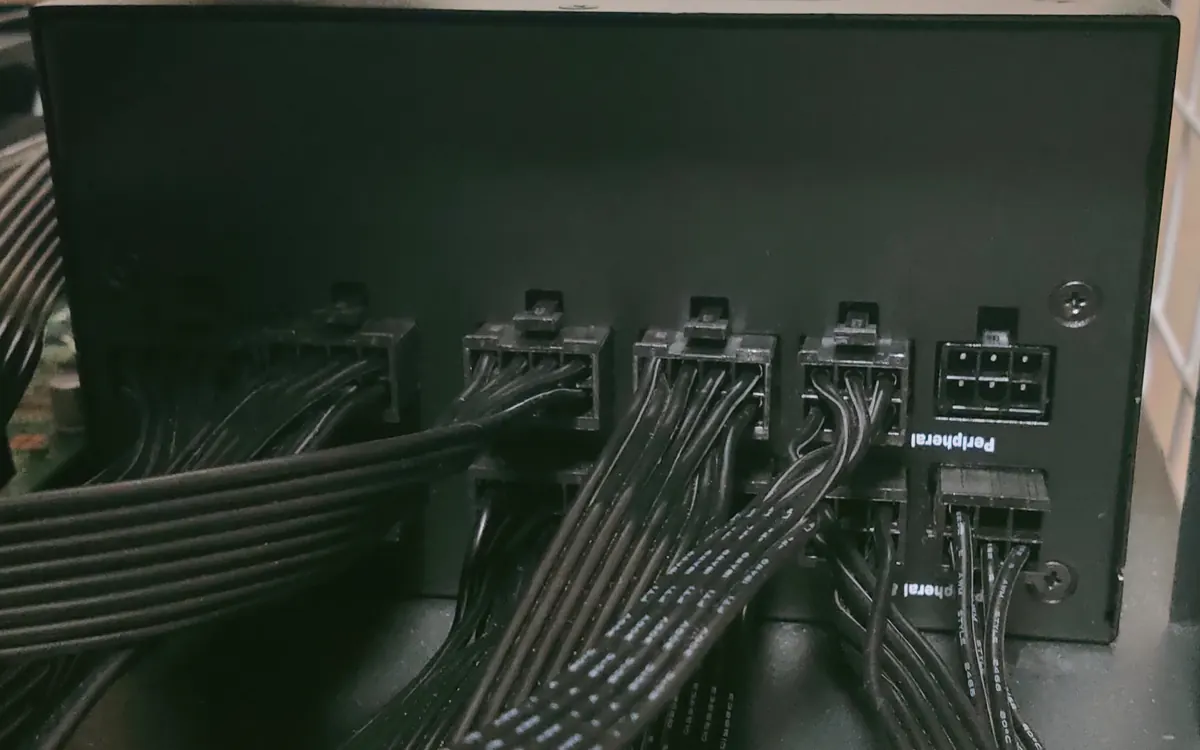
The power supply (PSU) gets the least attention in most PC builds, but it powers every other part. A unit that is too weak or poorly made can cause crashes under load, random shutdowns while gaming or worse. Here is how to choose one without guesswork.
How many watts do you need?
Most of a gaming PC's power goes to two parts: the graphics card and the processor. Everything else (motherboard, RAM, SSDs, fans) usually adds well under 100 W.
- Check the GPU maker's recommendation. NVIDIA, AMD, Intel and board partners list a "recommended system power" on each card's spec page. It assumes a typical CPU and includes headroom, so it's the simplest safe answer.
- Or estimate it yourself: add the GPU's rated board power to your CPU's maximum power, add about 75–100 W for the rest of the system, then add 30–50% headroom.
- Use a PSU calculator from a PSU maker or retailer as a cross-check.
Why the headroom? Modern GPUs and CPUs draw short transient spikes above their rated power. PSUs also run most efficiently and quietly at roughly 40–60% load. A bit of spare capacity also covers a future graphics card upgrade.
| Typical PSU range | |
|---|---|
| Office / integrated graphics | 300–450 W |
| Mid-range gaming GPU | 550–750 W |
| Upper mid-range to high-end GPU | 750–850 W |
| Flagship GPU + high-end CPU | 1000 W and up |
Efficiency: what 80 PLUS ratings mean
80 PLUS (Bronze, Silver, Gold, Platinum, Titanium) certifies how much wall power ends up as usable power instead of heat. A Gold unit wastes less energy and usually runs cooler and quieter than a Bronze one. The rating says nothing about the quality of the components or protections, though. Cybenetics (ratings such as Gold, Platinum, plus noise ratings) is a newer, more detailed certification you'll see on many units.
For most builds, 80 PLUS Gold is the sensible middle ground. Higher tiers save a little more power but cost noticeably more.
ATX 3.x and the 12V-2x6 connector
Recent high-power NVIDIA cards use a single 16-pin 12VHPWR, now revised as 12V-2x6, cable instead of several 8-pin PCIe plugs. PSUs built to ATX 3.0/3.1 are designed for GPU power spikes and usually ship with a native 12V-2x6 cable.
- With an older PSU, use the adapter that comes with the card, connecting every required 8-pin plug, and make sure the PSU's wattage is enough.
- Push the 16-pin connector in fully and avoid sharp bends right at the plug. A loose connection is the main cause of melting reports.
- Many AMD and Intel cards still use standard 8-pin PCIe connectors. Count how many your card needs.
Quality and features worth paying for
- Protections: over-current (OCP), over-voltage (OVP), over-power (OPP), short-circuit (SCP) and over-temperature (OTP).
- Warranty: good units typically come with 7–12 years. That's a strong signal of confidence.
- Modular cables: fully or semi-modular units let you plug in only the cables you need, which makes building and airflow easier.
- Size: ATX is standard. Small-form-factor cases need SFX or SFX-L, so check your case first.
- Fan mode: a zero-RPM or "eco" mode keeps the fan stopped at low load for silent desktop use.
Avoid unbranded units with suspiciously high wattage for the price. Professional reviews that load-test PSUs are the best way to compare specific models.
Do you need a new PSU?
You probably do if you're installing a more powerful graphics card whose recommended wattage exceeds your current unit, if your PC shuts down or reboots under gaming load, or if your PSU is very old or lacks the connectors your GPU needs. For the order in which to upgrade parts, see our PC upgrade guide. Buying a used graphics card? Check its power connectors before you pay.
Frequently asked questions
Is a higher-wattage PSU wasteful?
Not really. A PSU only delivers the power your parts draw. An oversized unit costs more to buy, but it doesn't draw its full rating from the wall.
Can a weak PSU damage my PC?
An overloaded quality PSU should shut down through its protections. Cheap units with poor protections are riskier, which is why quality matters.
Can I reuse modular cables from another PSU?
No. Pinouts differ between brands and even between models. Use only the cables that came with your PSU.
More from Computers & AI
View all →Read next
How to choose a baby monitor: Wi‑Fi vs non‑Wi‑Fi, security
Audio, local video or Wi‑Fi app monitor? How to choose a baby monitor by range, night vision, battery, privacy and security, plus the setup steps that matter.
HDMI vs DisplayPort: which cable should you use in 2026?
HDMI vs DisplayPort explained: HDMI 2.1 and 2.2 vs DisplayPort 1.4 and 2.1 bandwidth, which to use for gaming monitors, TVs, consoles and laptops, plus cables.
Smart ring vs smartwatch: which health wearable should you buy?
Smart ring or smartwatch? Compare sleep and heart-rate tracking, battery life, workouts, GPS, subscriptions, sizing and phone compatibility to pick the right wearable.