Chrome adds 'suspicious site' warnings and ClickFix checks
Chrome's Enhanced Protection gets softer 'this site doesn't seem right' warnings, server-side Gemini scam checks and alerts when you copy a ClickFix command.
LandGadget Newsroom · · 3 min read
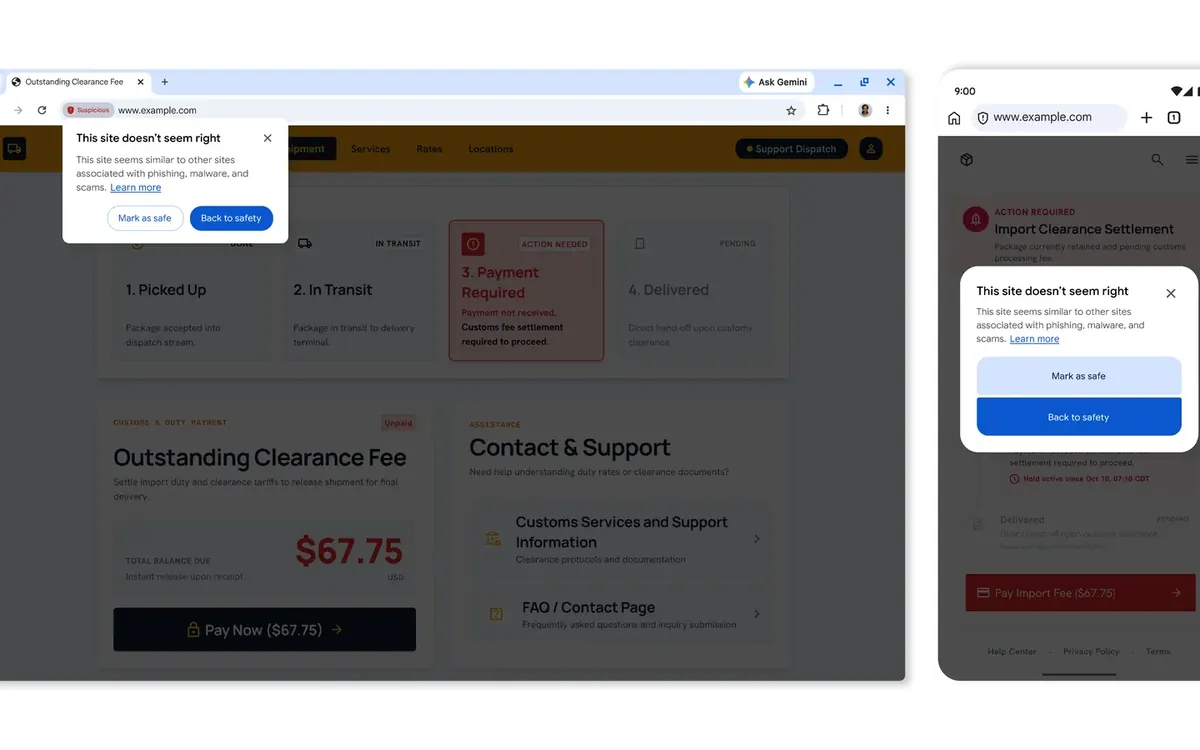
The new warnings trade a little privacy for a lot of coverage. Enhanced Protection now reads more of the web on your behalf, and for most people that is a good deal.
What's new. Google is adding three protections to Safe Browsing Enhanced Protection, Chrome's optional stronger security mode, the company announced on Tuesday. Google's screenshots show the new warnings in Chrome on both desktop and Android.
The key points.
- Two levels of warnings. Pages that are known to be malicious still get the full-screen red warning. Pages that only look like known scams now get a lighter pop-up, "This site doesn't seem right", with Mark as safe and Back to safety buttons. This lets Chrome warn about many more sites without scaring people off legitimate ones.
- Gemini in the cloud. Last year Chrome used an on-device Gemini model to catch tech-support scams on supported devices. It now uses a larger server-side Gemini model for every Enhanced Protection user, aimed at fake antivirus pages, bogus browser updates and similar scams. The model looks at the brand a page claims to be, what it's trying to get you to do and how likely it is to be a scam, and Safe Browsing combines that with domain reputation. Google says page text is only sent when a site already shows strong scam signals, and it is processed ephemerally, so it is not logged, kept or used to train models.
- ClickFix detection. ClickFix pages tell you to "fix" a fake problem by pasting a command into PowerShell, Terminal or the Run box. When you copy a suspicious command, Chrome now strips personal data from the clipboard, sends it to Safe Browsing and warns you if it's dangerous.
Our take. The ClickFix check is the most useful part. These attacks deliberately move the download out of the browser and into the system's own tools, so they slip past Chrome's normal download protections. Catching the copy step closes that gap. Treat the "ten times safer" headline with care, though: Google calculates it by comparing how many warnings Enhanced Protection users see with Standard users, not by counting attacks it stopped.
There is a trade-off. Enhanced Protection already sends more browsing data to Google than Standard mode, and now page text and copied commands can go to Google's servers too. Google's ephemeral-processing promise is reassuring, but you have to take it on trust. For most people, especially less technical relatives, it's still worth turning on. You'll find it in Settings → Privacy and security → Security. More than 1 billion people had it enabled in 2025, Google says.
On phones, pair it with Android's scam protection in Google Messages, and read how a fake WhatsApp app slipped into the Play Store. For a different kind of AI-era privacy slip, see how Meta Muse share links exposed private chats.
More from Computers & AI
View all →Read next

ID@Xbox x IGN showcase: 7 highlights for Xbox and Game Pass
The October ID@Xbox and IGN show revealed a Digging a Hole sequel, dated The Wolf Among Us Remastered and Zero Parades, and surprise-launched Arctic Eggs.

UK watchdog moves to open iPhone NFC to Apple Pay rivals
The CMA wants Apple to let UK apps use the iPhone's contactless chip through both main NFC standards, at much lower fees. Consultation closes 17 November.

SwitchBot permanent outdoor lights add Matter for $240
SwitchBot's 30-metre Permanent Outdoor Lights mix RGB effects with real warm and cool white LEDs and join Apple Home, Google Home or Alexa via Matter.