What is Home Assistant? A beginner's guide (2026)
What Home Assistant is, what it can do, which hardware to run it on, HA OS vs Container, and how to get started step by step without breaking your smart home.
LandGadget Newsroom · · 7 min read
If you own smart devices from more than one brand, you probably have more than one app: one for the lights, one for the robot vacuum, one for the thermostat, and a voice assistant that only understands half of them. Home Assistant is the popular open-source answer to that mess. It pulls everything into one dashboard, lets devices from different brands trigger each other, and does most of it without the cloud.
This guide explains what Home Assistant is, what it's good at, what you need to run it, and how to get started without spending a weekend fixing it.
What Home Assistant is
Home Assistant is free, open-source home automation software. It started as a hobby project by Paulus Schoutsen in 2013 and is now one of the largest open-source projects on GitHub, stewarded by the non-profit Open Home Foundation. Development is funded largely through Nabu Casa, the company behind the optional Home Assistant Cloud subscription.
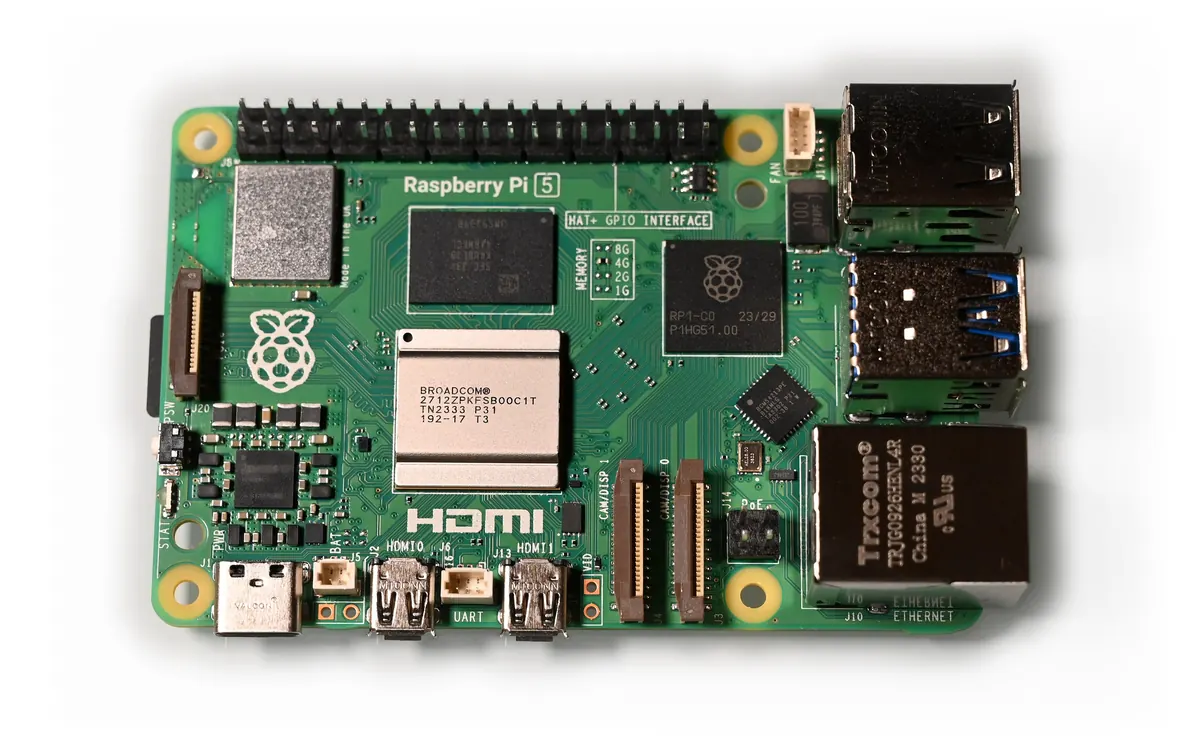
Instead of living on a company's server, Home Assistant runs on a small computer in your home: a dedicated box, a Raspberry Pi or an old mini PC. It talks to your devices over your home network (and over radio protocols such as Zigbee, Z‑Wave or Thread, if you add a radio), so it can:
- Show everything in one place: lights, plugs, sensors, cameras, speakers, climate, energy use.
- Run automations across brands, for example "when the last person leaves, turn off the lights, set the heating to eco and start the robot vacuum".
- Keep working offline. Local devices and automations don't depend on the internet. We cover why that matters in our guide to a smart home without internet.
- Track energy from smart plugs, meters and solar inverters.
- Talk to your other ecosystems: it can control devices that are also in Apple Home, Google Home or Alexa, and act as a Matter controller.
It connects to thousands of products through integrations, which are mostly maintained by the community. Some talk to devices directly on your network; others go through a manufacturer's cloud, so check before you buy.
What you need
| Home Assistant Green | Raspberry Pi 4/5 | Spare x86-64 mini PC | |
|---|---|---|---|
| Setup effort | Lowest: comes pre-installed | Flash a microSD card | Write an image to the internal drive |
| Extra parts | Ethernet cable | Power supply, microSD card, Ethernet | USB stick for installing, Ethernet |
| Room to grow | Fine for typical homes | Fine for typical homes (2 GB RAM minimum) | Most headroom for cameras, voice, many apps |
| Best for | Beginners who want it to just work | Tinkerers with a Pi in a drawer | People with an old PC or NUC |
All three run Home Assistant OS, the recommended way to install it. You'll also want a wired Ethernet connection to your router; Home Assistant's own instructions assume it.
Optional extras:
- A Zigbee, Thread or Z‑Wave radio (a small USB dongle) if you want to use cheap battery sensors, buttons and bulbs that don't use Wi‑Fi. Our explainer on Matter and Thread shows where Thread fits.
- A phone with the free Home Assistant companion app for iOS or Android. It adds notifications and lets your phone act as a presence sensor.
HA OS or Container?
Home Assistant officially supports two installation types:
- Home Assistant OS: a small dedicated operating system that includes everything. It supports apps (older guides call them add-ons), such as a Zigbee or MQTT server, one-click updates and backups. This is what Home Assistant recommends for most people.
- Home Assistant Container: you run it in Docker on a Linux system you manage yourself. It has the same automations, dashboards and integrations, but no apps, and you handle updates manually. Some features that rely on apps, such as Thread and Z‑Wave, have no out-of-the-box support here.
If you don't already run a home server, pick HA OS. If you do, you can still run HA OS as a virtual machine on it (for example in Proxmox).
Getting started in six steps
- Install it. Plug in a Green, or flash HA OS onto your Pi or PC using the official instructions. Home Assistant is also testing a new installer with a live USB mode for mini PCs, but it is still an alpha.
- Open the onboarding page. On a computer on the same network, go to
http://homeassistant.local:8123and create the owner account. Use a strong, unique password. - Accept discovered devices. Home Assistant finds many devices on your network automatically. Add them one area at a time (kitchen, living room) so the setup stays tidy.
- Turn on backups and copy them off the device, to a NAS or cloud storage. This is the single most important step.
- Build one simple automation, such as lights on at sunset. Then add more slowly. Blueprints let you import tested automations shared by others.
- Decide on remote access. Home Assistant Cloud (a paid Nabu Casa subscription that also funds development) is the easiest route. Alternatives include a VPN. Avoid simply opening a port on your router.
Is Home Assistant right for you?
+ Pros
- Works with far more brands than any single ecosystem
- Runs locally, so it's fast and private
- Free software, no mandatory subscription
- Powerful automations and energy tracking
− Cons
- You need a device running 24/7 at home
- More setup and occasional maintenance than an Apple, Google or Amazon hub
- Monthly updates sometimes change things, so read the release notes
- Some integrations still depend on manufacturer clouds
If you only have a few bulbs from one brand, that brand's app may be enough. Home Assistant shines once you have a mix: a smart thermostat, a robot vacuum (see our robot vacuum setup guide), cameras and sensors that otherwise never talk to each other.
Frequently asked questions
Is Home Assistant free?
Yes. The software is free and open source. You pay for the hardware it runs on, and optionally for Home Assistant Cloud, a Nabu Casa subscription for easy remote access and cloud voice features.
Does Home Assistant need the internet?
No. It runs on a computer in your home and controls local devices without the internet. You need a connection for updates, remote access and integrations that rely on a manufacturer's cloud.
Can I run Home Assistant on a Raspberry Pi?
Yes. Home Assistant's installation page lists the Raspberry Pi 4 or 5 with at least 2 GB of RAM, a power supply, a microSD card and an Ethernet connection.
Does Home Assistant work with Alexa, Google Home and Apple Home?
It can control many devices that are also in those ecosystems, and it can expose its own devices to them. Some of those connections are easiest with Home Assistant Cloud; others can be set up manually.
What is the difference between Home Assistant OS and Container?
Home Assistant OS is a complete operating system with apps, one-click updates and backups, and is recommended for most users. Container runs in Docker on your own Linux system, without apps, and you update it yourself.
More from Smart Home
View all →Read next
Factorio 2.1 is stable: 6 changes to know before you update
Factorio 2.1 is out of experimental with mixed rockets, circuit wire changes, optional Quality and native ARM64 Linux. What changed and why to back up your saves.
How to update your router firmware safely: 8 steps
How to update router firmware step by step: find your exact model, back up settings, update via app or web page without bricking it, then lock down the router.

NASA's new Artemis plan: Earth-orbit test, landing in 2028
Artemis III becomes a 2027 Earth-orbit test with both commercial landers, and the first crewed landing moves to 2028 with whichever lander is ready first.