How to clean a robot vacuum: brushes, filter, sensors, dock
How to clean a robot vacuum step by step: bin, filter, main and side brushes, wheels, sensors, mop pads and dock, plus how often to replace parts per iRobot and Roborock.
LandGadget Newsroom · · 8 min read
On this page
A robot vacuum that suddenly cleans worse, gets lost or refuses to dock is rarely broken. Most of the time hair is wrapped around a brush, the filter is clogged or a sensor is covered in dust. Ten minutes of maintenance a week fixes most of these problems and helps the brushes, motor and battery last longer.
This guide covers what to clean, in what order and how often, with the intervals that iRobot and Roborock publish for their robots. Designs differ between brands, so if your manual says something different, follow the manual. If you have just bought a robot, our robot vacuum setup guide covers the first steps, and the robot vacuum buying guide explains which features make upkeep easier.
Before you start: switch the robot off, or at least take it off the dock, and put it upside down on a soft towel so you do not scratch the top cover or the lidar turret. Roborock tells owners to power the robot off before any cleaning or maintenance.
| Part | Clean | Replace (iRobot) | Replace (Roborock) |
|---|---|---|---|
| Dust bin | After each run (no self-empty dock) | — | — |
| Filter | Weekly, twice a week with pets | Every 2 months (many models); 3–6 months on Roomba 200/2000 | Washable: every 6–12 months |
| Main brush(es) | Weekly to every 2 weeks | Every 6–12 months | Every 6–12 months |
| Side brush | Every 2 weeks to monthly | Every 3–6 months | Every 3–6 months |
| Mop pads | After each mopping run | Every 3–6 months (Combo) | Every 1–3 months |
Empty and rinse the dust bin
If your robot has no self-empty dock, empty the bin after every run; iRobot lists this as an after-each-use job for many Roomba models. A full bin cuts airflow, so suction drops long before the bin looks packed.
Every few weeks, take the bin out completely and shake out the dust that collects in the corners and around the inlet. Some bins are washable. Roborock, for example, suggests filling the bin with clean water, shaking it and pouring it out, then letting it dry for at least 24 hours before refitting it. Check your manual first: bins with built-in electronics or full-bin sensors must not get wet.
Clean or replace the filter
The filter protects the motor, and a clogged one is the most common reason for weak suction. Take it out and tap it against the side of your bin to knock the dust loose. Do not brush the pleats or poke them with your fingers; Roborock warns this can damage the filter.
Only wash a filter if the manual says it is washable, and then use plain water without detergent. Let it dry fully, at least 24 hours for Roborock filters, before you put it back. A damp filter can grow mould and let dust through to the motor. Keeping a spare filter means the robot does not sit idle while one dries.
iRobot recommends cleaning the filter once a week, or twice a week in homes with pets, and replacing it every two months on many Roomba series. Roborock suggests cleaning its washable filter every two weeks and replacing it every 6–12 months.
Detangle the main brush
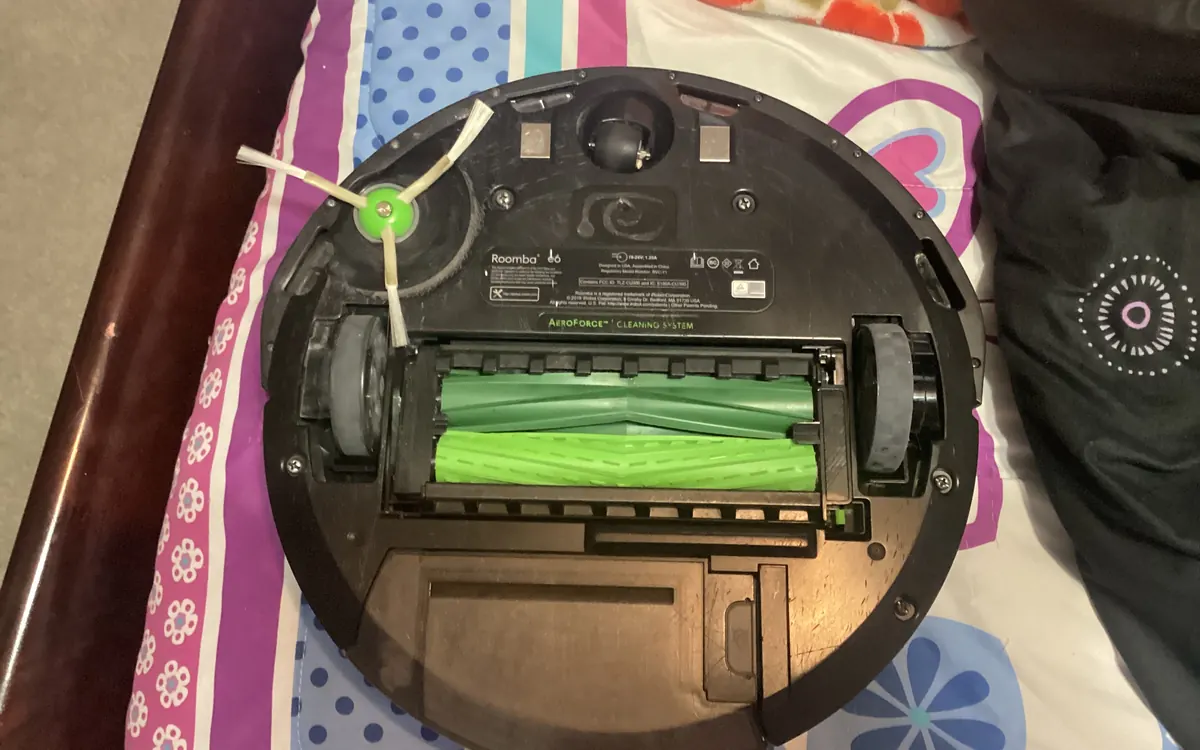
Open the brush guard (usually two latches), lift the main brush or rubber rollers out and remove the end caps. Hair winds around the ends and the axle, not just the bristles, and that is what makes a brush squeal or stall. Cut wrapped hair with the tool that came with your robot or a seam ripper, pulling it off in strips rather than tugging.
Wipe the brush and the brush cavity with a damp cloth, then let them dry. Roborock advises against corrosive cleaners or disinfectant on the main brush and says to air-dry wet brushes away from direct sunlight. When refitting, match the colours or shapes on the brush ends and the robot, and press the guard until it clicks.
Both iRobot and Roborock suggest replacing main brushes every 6–12 months, sooner if bristles are flattened, rubber fins are torn or the brush no longer turns freely.
Clean the side brush
The small spinning side brush sweeps dirt out of corners and along skirting boards. Hair tangles around its base, and bent bristles push dust away instead of towards the main brush. Unscrew or pop it off, remove the hair from the brush and from the post it sits on, and refit it.
iRobot recommends cleaning the edge brush every couple of weeks or as needed and replacing it about every 3 months, while its newer charts and Roborock's manuals say every 3–6 months. If the arms are bent out of shape, replace it; straightening them rarely lasts.
Check the wheels and caster
Pull the front caster wheel out (it usually pops out with a firm tug), remove hair from the axle and wipe the housing. iRobot says a front wheel clogged with hair and debris can damage floors, and recommends checking it every two weeks. Spin the drive wheels by hand and pick out anything caught in the treads.
Wipe the sensors and camera
Cliff sensors on the underside, the bumper, wall sensors and any front camera or lidar window need a light wipe with a clean, dry microfibre cloth about once a month. iRobot specifically warns against spraying cleaning solution onto sensors or into sensor openings. Dusty cliff sensors can make a robot think it is at the edge of a step and refuse to cross dark rugs or thresholds.
Wipe the charging contacts
Dirty contacts on the robot and the dock cause the classic "it says charging but the battery is flat" problem. Wipe both sets with a dry cloth every couple of weeks or monthly; iRobot suggests a lightly dampened melamine sponge for stubborn grime. Make sure the dock sits flat against the wall and has not been nudged.
Look after the self-empty dock
A self-emptying dock saves you from emptying the bin, but it needs attention too. Replace the dust bag when the app tells you or the bag is full, and check the evacuation port where the robot connects, because clumps of hair can block it. If the dock starts emptying loudly or the robot's bin stays full after docking, look for a blockage in that path.
On docks that wash mops, empty the dirty-water tank after mopping, rinse it, and clean the wash tray so it does not start to smell. Leave the tank lid open for a while to dry.
Wash the mop pads and water tank
Rinse or machine-wash mop pads after mopping runs and let them dry fully. Roborock notes that a dirty mop cloth hurts mopping performance and suggests replacing cloths every 1–3 months; iRobot gives 3–6 months for Combo mopping pads. Empty the robot's own water tank after each job instead of leaving water in it, and use only the cleaning solution your manufacturer approves, because some liquids damage pumps and seals.
Replace worn parts on time
Most apps track part life and will remind you, but treat those reminders as a guide. The best signal is the part itself: frayed bristles, torn rubber, a filter that stays grey after tapping, or a mop pad that no longer comes clean. Buy official or well-reviewed replacement parts that list your exact model, because brushes and filters are rarely interchangeable between series.
If the robot still misses spots after a full clean, rerun the mapping and check for new obstacles. Our setup guide explains how to rebuild the map and add no-go zones. Quieter robots, like the new Matic Serene, also depend on clean brushes: a tangled brush roll is often the loudest part of a robot.
Frequently asked questions
How often should I clean my robot vacuum?
Empty the bin after each run if there is no self-empty dock. About once a week, or twice a week with pets, detangle the brushes and tap out the filter. Wipe sensors and charging contacts every couple of weeks to monthly.
Can I wash a robot vacuum filter?
Only if the manual says it is washable. Use plain water without detergent, do not brush the pleats, and let it dry completely, at least 24 hours for Roborock filters, before refitting.
How often should I replace robot vacuum brushes?
iRobot and Roborock both suggest replacing main brushes every 6 to 12 months and side brushes every 3 to 6 months, or sooner if they look worn.
Why is my robot vacuum losing suction?
The usual causes are a full bin, a clogged filter, hair wrapped around the main brush, or a blocked inlet or dock port. Clean those first before assuming the motor is failing.
Why does my robot vacuum not charge on the dock?
Dirty charging contacts on the robot or dock are the most common cause. Wipe both with a dry cloth, make sure the dock is flat against the wall and plugged in, and check that nothing blocks the path to it.
More from Smart Home
View all →Read next

Half-Life: Alyx adds foveated rendering on PC: which GPUs work
Valve's new Half-Life: Alyx patch adds a foveated rendering option on PC. It needs Nvidia GTX 16 or RTX 20 series or newer, AMD via Vulkan, and works best with eye tracking.

Iceberg A-81 reaches South Georgia after a 3-year drift
NASA satellite images show Antarctic iceberg A-81, about 1,550 km² of ice from the Brunt Ice Shelf, slowing at South Georgia's undersea shelf. Its route and why it matters.
Samsung Community goes offline for 72 hours: back up first
Samsung Community shuts for 72 hours from October 30 for an overhaul. DMs, drafts, bookmarks and subscriptions won't migrate. What to save and what changes after.